Base64 Decoder
What is Base64 Decode?
Base64 decoding converts encoded Base64 data into the content it originally represented. A Base64 decoder reads the encoded characters and converts them into the original text or bytes. This makes it useful when you need to decode Base64 data received from an API, configuration file, application, or other digital source.
Base64 is an encoding method that represents binary data using a set of 64 characters. The standard Base64 character set includes uppercase letters (A-Z), lowercase letters (a-z), numbers (0-9), plus (+), and slash (/). An equals sign (=) may appear at the end as padding.
For example, the text:
Hello World!
can be encoded as:
SGVsbG8gV29ybGQh
When you decode Base64, the encoded value is converted back to:
Hello World!
A Base64 decoder online makes this process quick because you do not need to write code or install additional software. You can paste a Base64 string into a decoder and convert it to readable text in seconds. This is particularly useful for developers who need to inspect encoded values while testing or debugging applications.
How Base64 Decoding Works
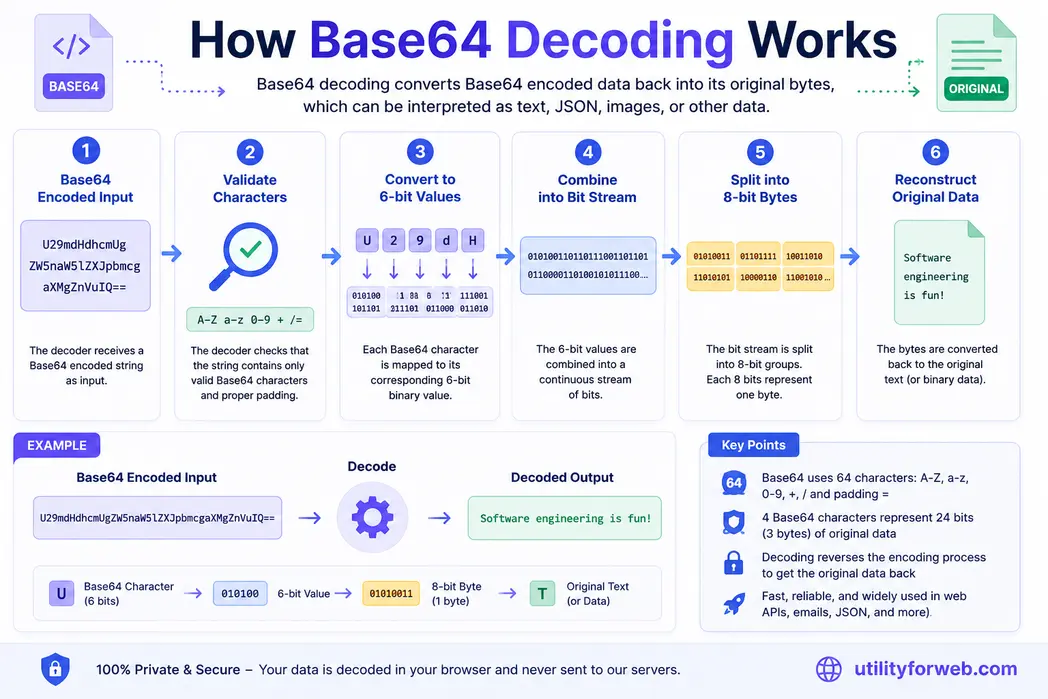
Base64 converts data into groups of characters that are safe to represent as text. During Base64 decoding, the process is reversed. The decoder interprets each Base64 character, converts it into the corresponding bits, and uses them to rebuild the original data.
For text-based input, this can result in a readable string. For example:
Base64:SGVsbG8gV29ybGQh
Decoded: Hello World!
A Base64 string decoder can also process encoded values containing JSON, HTML, XML, or other text-based data, provided the input is valid Base64.
Base64 Decoding Is Not Decryption
Base64 encoding should not be confused with encryption. Base64 decoding does not decrypt protected information because Base64 does not provide security or confidentiality. Anyone who has a Base64-encoded value can decode it when they know the encoding format.
Use encryption when you need to protect sensitive information. Use Base64 when you need to represent data in a text-friendly format.
Why Use a Base64 Decoder?
Developers commonly use Base64 decoding when working with:
- API requests and responses
- JSON data
- Configuration values
- Encoded text
- Data transmitted between applications
- Email and MIME data
- Data URIs
- Application testing and debugging
A free Base64 decoder lets you quickly check or convert encoded data without having to create a script.
If you have a Base64-encoded string, paste it into the decoder above to decode Base64 online and view the resulting data.
How to use Base64 Decoder
- Copy the text that you wish to encode.
- Once copied, open https://www.utilityforweb.com/base64-decode/
- Paste the content you copied into the first text area on the screen.
- Click "Decode" button to decode string to its original form.
- Check the affair and click on
Copy to clipboardto copy.
Common Base64 Decoding Errors
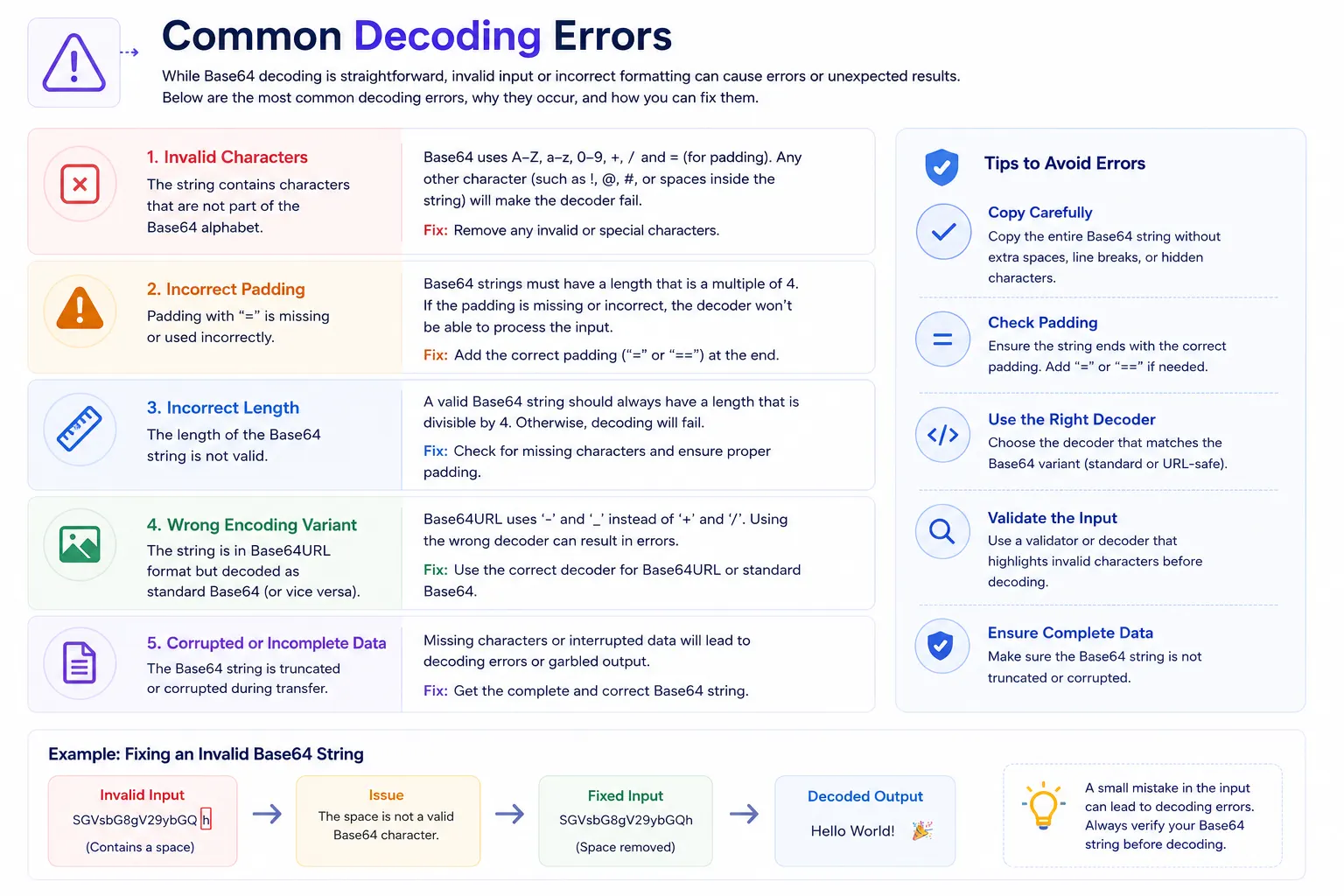
Base64 decoding usually takes only a moment when the input follows the expected format. However, a Base64 decoder can return an error or produce unexpected output when the encoded value is incomplete, incorrectly formatted, or created with a different Base64 variant. Understanding these common problems can help you identify the issue before trying to decode the same string repeatedly.
1. Invalid Base64 Characters
Standard Base64 uses uppercase letters from A-Z, lowercase letters from a-z, numbers from 0-9, plus (+), and slash (/). The equals sign (=) can also appear at the end as padding.
If your Base64 string contains unexpected characters, such as spaces or other symbols, the decoder may reject the input. This can happen when you copy an encoded value from an email, document, log file, or web page where additional characters are introduced.
How to fix it: Check the entire string and remove characters that do not belong to the expected Base64 format. Be careful not to remove valid characters that are part of the encoded data.
2. Incorrect Base64 Padding
You may see one or two equals signs (=)at the end of a Base64-encoded string. These characters provide padding when the original data does not fill a complete Base64 group.
Missing or incorrectly placed padding can prevent some decoders from processing the input correctly. However, not every Base64 implementation requires visible padding, so the expected format can depend on the application that generated the value.
How to fix it: Check whether the encoded value uses the expected padding format. If the data came from a specific application or API, follow the format used by that system.
3. Incorrect Input Length
A standard Base64 string is normally arranged in groups of four characters. If characters are removed from the middle or end of an encoded value, the resulting length may no longer match the expected structure.
This often happens when a value is copied incompletely or gets truncated during data transfer. A Base64 decoder may not be able to recover the original data correctly when some of the encoded string is missing.
How to fix it: Compare the value with the original source and make sure you copied the complete Base64 string. Also check for accidental line breaks, missing characters, or incomplete data.
4. Using the Wrong Base64 Variant
Not every Base64 value uses exactly the same character set. Base64URL, for example, is designed to work safely in URLs and replaces some characters used by standard Base64. It uses a hyphen (-) and underscore (_) instead of the plus (+) and slash (/) used by standard Base64.
This difference is important when working with web applications, tokens, and JWTs. A decoder designed for standard Base64 may not handle a Base64URL value correctly unless it supports that variant.
How to fix it: Determine which Base64 format produced the value. Use a decoder that supports the appropriate variant instead of assuming every encoded string uses standard Base64.
5. Corrupted or Incomplete Data
A Base64 value can become unusable if it is truncated or changed during copying, storage, or transmission. Even a small missing portion can prevent the decoder from reconstructing the original bytes correctly.
For example, copying only part of a long encoded value from a log file may result in an error or produce incomplete output. In some cases, the decoder may return output that looks readable but does not match the original data.
How to fix it: Obtain the complete encoded value from its original source and try decoding it again. Avoid manually editing long Base64 strings unless you know exactly which characters need to change.
How to Avoid Base64 Decoding Errors
You can reduce decoding problems by checking the input before you decode Base64. Copy the complete value, watch for unwanted spaces or line breaks, and identify whether the data uses standard Base64 or Base64URL. If the value comes from an API, application, or file, compare it with the original data when the decoder reports an error.
If the input looks correct but still cannot be decoded, the problem may not be with the decoder itself. The value may have been generated using a different encoding format, transformed before you received it, or damaged during transmission.
Example of an Invalid Base64 String
Consider this value:
SGVsbG8gV29ybGQ h
The space inside the string is not part of the standard Base64 alphabet. Removing the unwanted space produces:
SGVsbG8gV29ybGQh
The corrected value can then be decoded to:
Hello World!
This example shows why checking the input carefully is important. A small formatting problem can stop a Base64 decoder online from processing an otherwise valid value.
If you encounter an error, start by checking the characters, padding, length, Base64 variant, and completeness of the input. Once the encoded value follows the expected format, you can use the Base64 Decoder above to convert it back into its original data.


Frequently Asked Questions
What is a Base64 Decoder?
A Base64 Decoder converts Base64-encoded data back into its original text or binary form. It reads the encoded characters and reconstructs the original data. This free online Base64 Decoder lets you decode valid Base64 strings quickly without installing software.
How do I decode Base64 online?
To decode Base64 online, paste your encoded string into the Base64 Decoder, start the decoding process, and review the resulting text or data. An online Base64 decoder lets you convert encoded values without writing code or installing additional software.
What does Base64 decoding do?
Base64 decoding reverses Base64 encoding. It converts the characters in a Base64 string back into the original bytes. When the decoded bytes contain text, the decoder can convert them back into readable content.
Can I decode a Base64 string online?
Yes. You can decode a valid Base64 string online by using a Base64 decoder. Paste the encoded value into the tool to convert it back into readable text or other supported data.
Can Base64 be decoded back to the original data?
Yes. Base64 encoding is reversible, so valid encoded data can be decoded back into the original bytes. The decoded result depends on the type of data that was originally encoded.
Can I decode Base64 to text?
Yes. If the Base64 value contains text data, a Base64 decoder can convert it back into readable text. The result may include plain text, JSON, HTML, XML, or other text-based content.
Can I decode Base64 JSON?
Yes. If JSON was encoded as Base64, you can decode the Base64 string to recover the original JSON content. You can then use a JSON formatter or validator to inspect and validate the decoded result.
Is Base64 decoding the same as decryption?
No. Base64 decoding is not decryption. Base64 is an encoding method that changes how data is represented; it does not protect the data with a secret key. Anyone with a valid Base64 value can decode it.
Is Base64 decoding secure?
Base64 decoding itself does not provide security because Base64 is not an encryption method. If you need to protect confidential information, use appropriate encryption instead of relying on Base64 encoding.
Which characters are used in Base64?
Standard Base64 uses uppercase letters A-Z, lowercase letters a-z, numbers 0-9, the plus sign (+), and the forward slash (/). The equals sign (=) can be used as padding at the end of an encoded value.
What does the equals sign (=) mean in Base64?
In Base64 encoding, the equals sign (=) serves as a padding character. It can appear at the end of an encoded string when the original data does not contain enough bytes to form a complete Base64 group.
What is Base64URL and how is it different from Base64?
Base64URL is a URL-safe variation of Base64. It replaces the plus sign (+) with a hyphen (-) and the forward slash (/) with an underscore (_). Padding may also be omitted. Base64URL is commonly used in web applications and JWTs.
Why does my Base64 decoder show an error?
A Base64 decoder may show an error when the input contains invalid characters, incorrect padding, incomplete data, or a format that uses a different Base64 variant. Check that the encoded value is complete and follows the expected Base64 format.
Can Base64 decoding return binary data?
Yes. Base64 can represent binary data such as images, documents, and other files. Decoding such a value produces the original bytes rather than necessarily producing readable text.
How does a Base64 Decoder work?
A Base64 Decoder converts each Base64 character into its corresponding 6-bit value, combines those values into groups of bits, and reconstructs the original bytes. When the bytes represent text, the decoder can display the resulting content.
How can I decode Base64 in JavaScript?
In JavaScript, the atob() function can decode standard Base64 strings. For example, atob('SGVsbG8=') returns the decoded value Hello. For Unicode text or binary data, additional handling may be required.
How can I decode Base64 in PHP?
PHP provides the base64_decode() function for decoding Base64 data. For example, base64_decode('SGVsbG8=') returns the original text Hello.
How can I decode Base64 in Python?
Python provides Base64 decoding through its built-in base64 module. The b64decode() function can convert a Base64 string back into its original bytes, which can then be decoded as text when appropriate.
Is this Base64 Decoder free to use?
Yes. This free Base64 Decoder lets you decode Base64 data online without installing software or creating an account. Enter a valid Base64 string and use the tool to view the decoded result.