Remove Line Breaks Online - Free Line Break Remover
Our Remove Line Breaks Online tool helps you quickly remove unwanted line breaks, newline characters, carriage returns, and paragraph breaks from your text. Whether you've copied content from a PDF, email, Microsoft Word document, Google Docs, or OCR software, you can clean and format your text in just a few clicks without installing any software.
This free Line Break Remover automatically detects different line-ending formats, including LF (Line Feed), CR (Carriage Return), and CRLF (Carriage Return + Line Feed). You can remove unnecessary line breaks to merge text into a single line or preserve paragraph breaks when you want to maintain the document's structure.
Everything runs directly in your browser, making the tool fast, secure, and convenient. Whether you're a developer cleaning JSON or CSV files, a writer editing copied text, a student formatting assignments, or an office professional preparing reports, this Remove Line Breaks tool saves time and produces clean, readable text instantly.
-
remove line breaks: This tool will remove all line and paragraph breaks and convert input text into a single paragraph.
-
Remove Paragraph Breaks: This tool will remove multiple line breaks but keep one paragraph break to keep and ensure the number of paragraphs of the given text.
How the Remove Line Breaks Tool Works
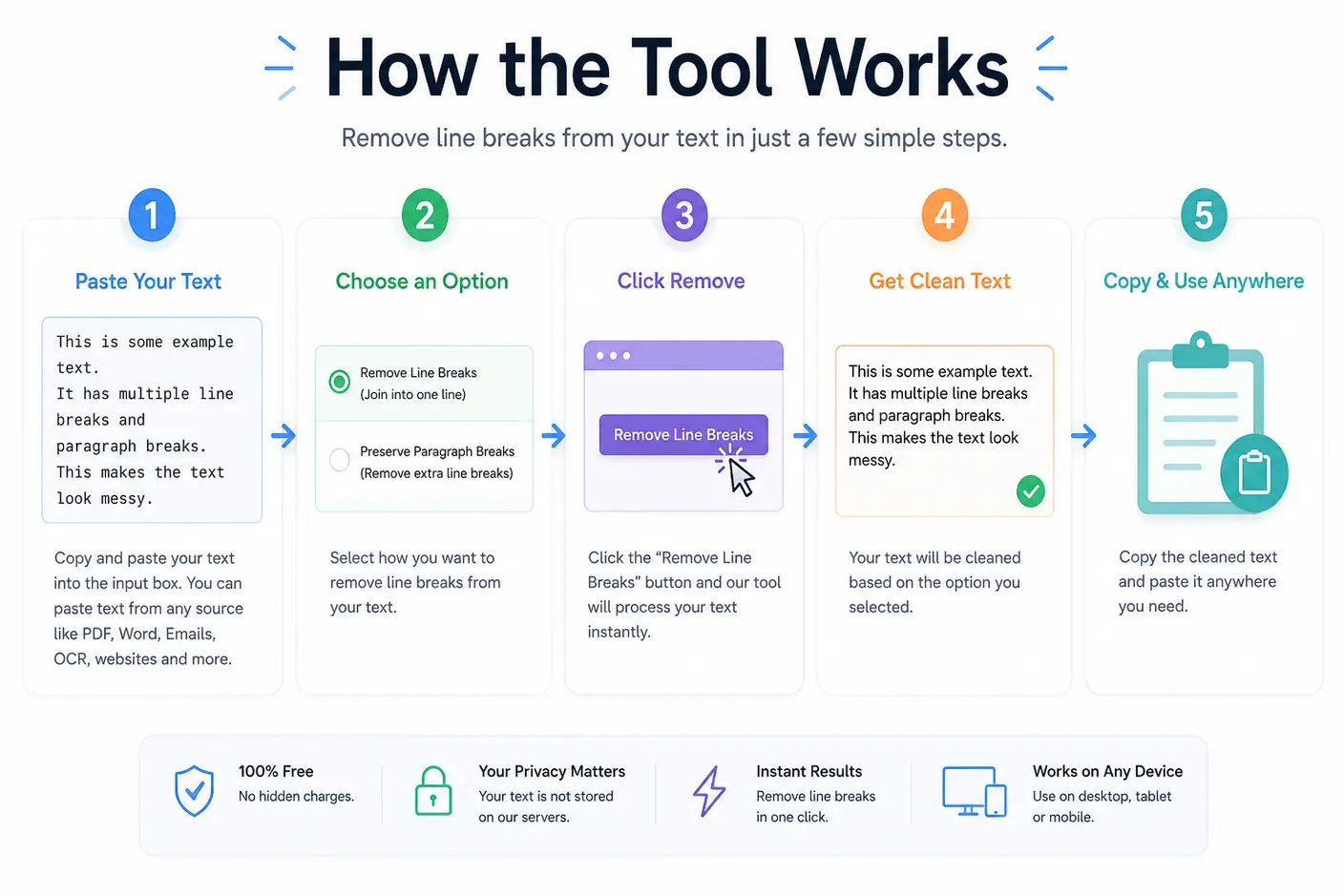
Our Remove Line Breaks Online tool is designed to simplify text formatting by removing unwanted line breaks, newline characters, carriage returns, and extra paragraph breaks in just a few seconds. Whether you're cleaning copied PDF text, fixing OCR output, formatting emails, or preparing data for development, the entire process is quick, secure, and requires no software installation.
- Paste Your Text: Copy the text that contains unwanted line breaks and paste it into the input box. The tool accepts text from almost any source, including PDF files, Microsoft Word documents, Google Docs, websites, emails, OCR software, log files, and code editors.
- Choose Your Preferred Option: Select how you'd like the tool to process your text. You can remove all line breaks to merge text into a single line or preserve paragraph breaks while removing unnecessary new lines. This flexibility makes the tool suitable for both document editing and data processing.
- Remove Line Breaks Instantly: Click the Remove Line Breaks button to process your text. The tool automatically detects common newline formats such as LF (Line Feed), CR (Carriage Return), and CRLF (Carriage Return + Line Feed), ensuring consistent results regardless of the operating system from which the text originated.
- Review the Cleaned Text: Your formatted text is displayed immediately in the output area. Only the selected formatting characters are removed, while your words, punctuation, and overall content remain unchanged.
- Copy and Use Anywhere: Copy the cleaned text with a single click and paste it into your preferred application. Whether you're updating a website, editing a document, importing CSV data, preparing JSON, or sharing content in an email, your text is ready to use.
What Is a Line Break and Why Remove It?
A line break is an invisible formatting character that moves text to a new line without necessarily starting a new paragraph. Line breaks help organize content and improve readability, but they can also create formatting issues when text is copied from PDFs, websites, emails, Microsoft Word documents, Google Docs, or OCR software.
In many situations, copied text contains unnecessary line breaks at the end of every line. Instead of flowing naturally, the content appears fragmented, making it difficult to read, edit, or reuse. A Remove Line Breaks Online tool eliminates these unwanted line breaks and newline characters while preserving the actual text, allowing you to create clean, professional-looking content in seconds.
Why Do Unwanted Line Breaks Appear?
Unwanted line breaks can occur for many reasons. Understanding where they come from helps you choose the best way to clean your text.
- Text Copied from PDF Files: Most PDF documents are designed for printing rather than editing. When you copy text from a PDF, line breaks are often inserted at the end of every visible line. This results in broken sentences that require manual cleanup before they can be reused.
- OCR (Optical Character Recognition): OCR software converts scanned documents and images into editable text. Although highly useful, OCR tools frequently introduce extra line breaks, empty lines, and inconsistent spacing that affect readability.
- Emails and Web Pages: Many email clients and websites automatically wrap text based on the available screen width. When copied into another application, these formatting characters remain, creating unnecessary line breaks that make the content harder to edit.
- Word Processors and Documents: Microsoft Word, Google Docs, and other document editors may preserve formatting when content is copied between applications. Depending on the destination, this can result in unexpected line breaks or additional paragraph spacing.
- Developer Files and Data: Developers often work with JSON, CSV, SQL queries, log files, and API responses that contain newline characters or different line-ending formats such as LF, CR, and CRLF. Removing unnecessary line breaks makes the data easier to analyze, share, or process.
Why Remove Line Breaks?
Removing unnecessary line breaks makes text cleaner, easier to read, and more suitable for editing or sharing. Instead of manually deleting dozens or hundreds of formatting characters, a Line Break Remover performs the task instantly while preserving the original content.
Common benefits include:
- Improve the readability of copied text.
- Merge multiple lines into a single continuous paragraph.
- Remove unwanted newline characters without changing the actual words.
- Clean text copied from PDFs, emails, websites, and OCR software.
- Prepare data for JSON, CSV, SQL, or other development tasks.
- Save time by eliminating repetitive manual formatting.
- Produce professional-looking content that is ready to publish or share.
When Should You Use a Remove Line Breaks Tool?
A Remove Line Breaks tool is useful whenever copied text contains unwanted formatting that interrupts the natural flow of content. Whether you're editing documents, preparing reports, or cleaning data, removing unnecessary line breaks improves readability and saves valuable time.
You should consider using this tool when:
- Copying text from PDF documents.
- Cleaning OCR-generated content.
- Formatting Microsoft Word or Google Docs content.
- Preparing articles or blog posts for publication.
- Editing email content before sending.
- Cleaning copied website text.
- Processing JSON, CSV, SQL queries, or log files.
- Combining multiple lines into a single paragraph.
- Removing unwanted carriage returns or line feeds from text.
- Standardizing text before importing it into another application.
Why Choose Our Remove Line Breaks Online Tool?
Our Remove Line Breaks Online tool is designed to make text cleanup fast, accurate, and effortless. It automatically recognizes common newline formats, supports multiple operating systems, and processes your content directly in the browser for improved privacy.
Whether you're a writer, student, developer, editor, researcher, or business professional, you can remove unwanted line breaks in just a few clicks without installing software or creating an account.
Types of Line Breaks (CR, LF & CRLF)
Although a line break appears the same when viewed on screen, different operating systems store line endings using different invisible characters. Understanding these line-ending formats can help you troubleshoot formatting issues when moving text between Windows, Linux, macOS, code editors, databases, or online applications.
Our Remove Line Breaks Online tool automatically detects and processes all common line-ending formats, so you don't have to worry about where your text originated.
-
CR (Carriage Return): Carriage Return (CR) is represented by the character \r. It was originally used by classic Macintosh systems to move the cursor back to the beginning of the current line.
Although CR is rarely used today, you may still encounter it in legacy files or older applications. A good Line Break Remover can recognize and remove CR characters without affecting your text. -
LF (Line Feed): Line Feed (LF) is represented by the character \n and is the standard line-ending format used by Linux, Unix, and many modern programming languages.
Developers frequently encounter LF characters in:- Source code
- JSON files
- CSV files
- Log files
- API responses
- Configuration files
Our tool can quickly remove unwanted line feed characters while preserving the content itself.
-
CRLF (Carriage Return + Line Feed): CRLF combines both Carriage Return (\r) and Line Feed (\n) into a single line-ending sequence (\r\n). It is the default line-ending format used by Microsoft Windows.
When text created on Windows is copied into another application or operating system, CRLF characters can sometimes produce unexpected formatting. Removing these unnecessary line breaks helps create cleaner, more consistent text.
Comparison of Line Break Types
| Line Break Type | Character | Common Operating System | Typical Use Case |
|---|---|---|---|
| CR | \r |
Classic macOS | Legacy text files and older Macintosh systems |
| LF | \n |
Linux, Unix, macOS | Programming, web servers, source code, JSON, CSV |
| CRLF | \r\n |
Windows | Text documents, Notepad, Microsoft Office, Windows applications |
CR vs LF vs CRLF
| Feature | CR | LF | CRLF |
|---|---|---|---|
| Full Name | Carriage Return | Line Feed | Carriage Return + Line Feed |
| Escape Sequence | \r |
\n |
\r\n |
| Still Common Today | Rare | Yes | Yes |
| Used by Windows | No | No | Yes |
| Used by Linux / Unix | No | Yes | No |
| Used by Classic Mac | Yes | No | No |
| Supported by This Tool | Yes | Yes | Yes |


Frequently Asked Questions
What is a line break, and why would I remove it?
A line break is a character that moves text to the next line without necessarily starting a new paragraph. Line breaks are commonly created when copying text from PDFs, emails, websites, or OCR software. A Remove Line Breaks tool combines broken lines into continuous text and improves its formatting without changing the content.
How does a line break differ from a paragraph break?
A line break simply starts a new line, while a paragraph break creates a new paragraph by adding an empty line between blocks of text. A good line break remover lets you remove unnecessary line breaks while preserving paragraph breaks when required, making documents cleaner without changing their structure.
Can I remove line breaks without removing paragraphs?
Yes. Our Remove Line Breaks tool offers options to remove unwanted line breaks while keeping paragraph breaks intact. This is useful when cleaning copied articles, reports, or documents where paragraph spacing should remain unchanged.
What are newline characters?
Newline characters are invisible formatting characters that indicate where a new line begins. Depending on the operating system, they may be stored as LF (Line Feed), CR (Carriage Return), or CRLF (Carriage Return + Line Feed). This tool automatically detects and removes newline characters without affecting the text itself.
What is the difference between CR, LF, and CRLF?
Different operating systems use different line-ending characters:
- LF (Line Feed): Used by Linux and Unix.
- CRLF (Carriage Return + Line Feed): Used by Windows.
- CR (Carriage Return): Used by older Macintosh systems.
Our newline remover recognizes all common line-ending formats, making it easy to clean text regardless of where it originated.
Can this tool remove line breaks from copied PDF text?
Text copied from PDF files often includes unnecessary line breaks after each line of content. Our Remove Line Breaks Online tool quickly joins those lines together, making the text easier to edit, share, or paste into documents without manual cleanup.
Can I clean text copied from Microsoft Word or Google Docs?
Yes. Formatting from Word documents or Google Docs may introduce unnecessary line breaks when pasted elsewhere. This tool removes those extra line breaks while preserving your text, making it ideal for creating clean, continuous content.
Does this tool work with OCR-generated text?
Yes. OCR (Optical Character Recognition) software often inserts unwanted line breaks and irregular formatting when converting scanned documents into editable text. Our tool helps remove line breaks and improve the readability of OCR-generated content in just one click.
Can I merge multiple lines into a single line?
Yes. If you want to merge text into one line, simply paste your content into the tool and remove all line breaks. This is especially useful for preparing text for CSV files, databases, programming, or online forms.
Does this tool remove carriage returns and line feeds?
Yes. The tool removes common line-ending characters, including Carriage Returns (CR), Line Feeds (LF), and CRLF combinations. The tool identifies the line-ending format in your text and processes it automatically, regardless of its source.
Will removing line breaks change my words or punctuation?
No. The tool only removes unwanted formatting characters such as line breaks and newline characters. Your words, punctuation, capitalization, and sentence order remain unchanged, ensuring the original meaning of your content is preserved.
How does the Remove Line Breaks tool protect my privacy?
No. Your privacy is important to us. Text processing takes place directly in your browser whenever possible, meaning your content is not permanently stored or shared. This makes the tool safe for cleaning personal notes, business documents, or sensitive text.
How much text can I remove line breaks from at once?
The tool is designed to handle both short and large blocks of text efficiently. While browser memory may impose practical limits for extremely large files, most users can remove line breaks from lengthy documents without any issues.
Can I use this tool on mobile devices?
Yes. Our Remove Line Breaks Online tool works on desktops, tablets, and smartphones. As long as you have a modern web browser, you can remove new lines and clean text from virtually any device without installing additional software.
Why does copied text from emails or websites contain so many line breaks?
Many email clients, websites, and document editors automatically insert line breaks to improve readability on different screen sizes. When you copy that text elsewhere, those formatting characters often remain. A line break remover eliminates these unnecessary breaks and creates cleaner text.
Can developers use this tool to clean code or data?
Yes. Developers frequently use this tool to remove newline characters from JSON, SQL queries, log files, CSV data, API responses, and other text-based formats. It provides a quick way to clean copied text before using it in development or testing.
When should I remove line breaks instead of paragraph breaks?
Remove line breaks when you want continuous text, such as cleaning copied PDFs, OCR output, or email content. Preserve paragraph breaks when formatting articles, blog posts, reports, or documentation where separate paragraphs improve readability. Choosing the right option ensures your content remains well structured.
Why should I use an online Remove Line Breaks tool instead of manual editing?
Manually deleting hundreds of line breaks is time-consuming and prone to errors. Our free Remove Line Breaks Online tool automatically removes unwanted line breaks, newline characters, carriage returns, and line feeds in seconds. It saves time, improves accuracy, and helps produce clean, professional-looking text for documents, emails, websites, and development projects.