Online Base 64 Encoder – Free Base64 Encoding Tool
How Base64 Encoding Works
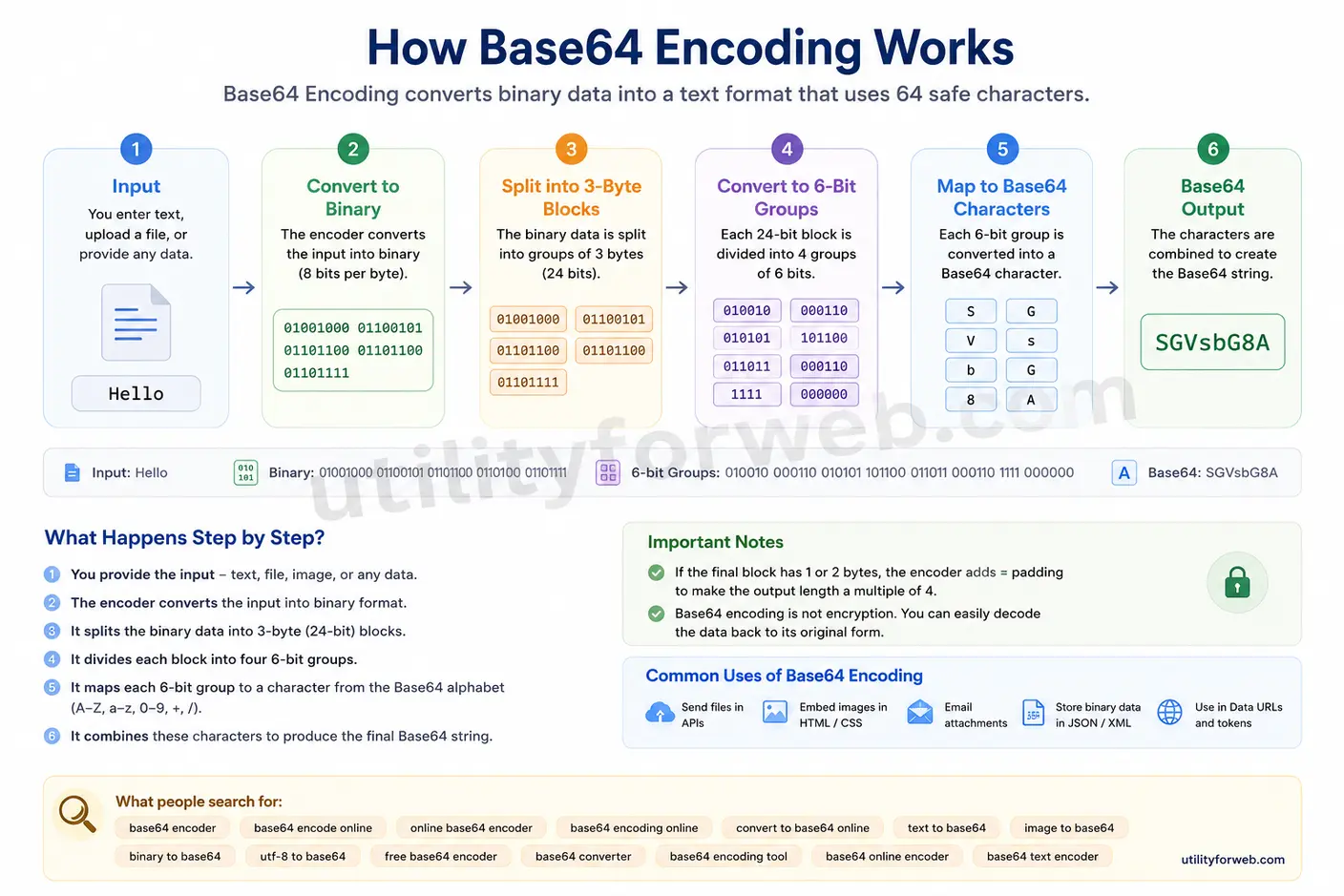
Base64 encoding changes text or binary data into a format that uses only 64 printable characters. This process makes data easier to send through systems that only accept plain text. A Base 64 Encoder does not encrypt your data. Instead, it changes the way the data is represented so different applications can read and transfer it safely.
Whether you need to base64 encode online, convert text to Base64, or prepare binary data for an API, the encoding process follows the same steps every time.
Step 1: Enter Your Data
Enter or paste the text you want to convert into Base64. You can also upload supported files if your application accepts binary data. An online Base64 encoder works directly in your browser, so you do not need to install any software.
Step 2: Convert the Data into Binary
The encoder reads every character and converts it into its binary (8-bit) value. For example, the letter A becomes 01000001. This step prepares the input for Base64 encoding.
Step 3: Split the Binary Data
The encoder groups the binary data into blocks of 24 bits. It then divides each block into four groups of 6 bits. This structure allows the encoder to map every 6-bit value to one of the 64 Base64 characters.
Step 4: Map Each Value to a Base64 Character
Each 6-bit value matches a character in the Base64 character set:
- A–Z
- a–z
- 0-9
- +
- /
If the input does not fit perfectly into a 24-bit block, the encoder adds = padding characters to complete the output.
Step 5: Generate the Base64 Output
The tool combines all mapped characters to create the final Base64 string. You can copy the encoded result instantly and use it in APIs, HTML, CSS, JSON, XML, email messages, or other applications.
Step 6: Use the Encoded Data
You can now use the generated Base64 string wherever a text-based format is required. Developers often use Base64 encoding before sending images, documents, or other binary files through web applications.
Why Use an Online Base64 Encoder?
A Base64 encoding online tool saves time and works on any device with a web browser. Instead of writing code, you can encode text in seconds and copy the result immediately.
Our free Base64 converter helps you:
- Encode text to Base64 instantly.
- Convert binary data into a text-friendly format.
- Prepare images and files for APIs and Data URIs.
- Generate Base64 output without installing software.
- Work securely in your browser without sending data to a server.
Whether you need a base64 online encoder for development, testing, or learning, the encoding process remains fast, reliable, and consistent.
Base64 Encoding vs Encryption: What's the Difference?
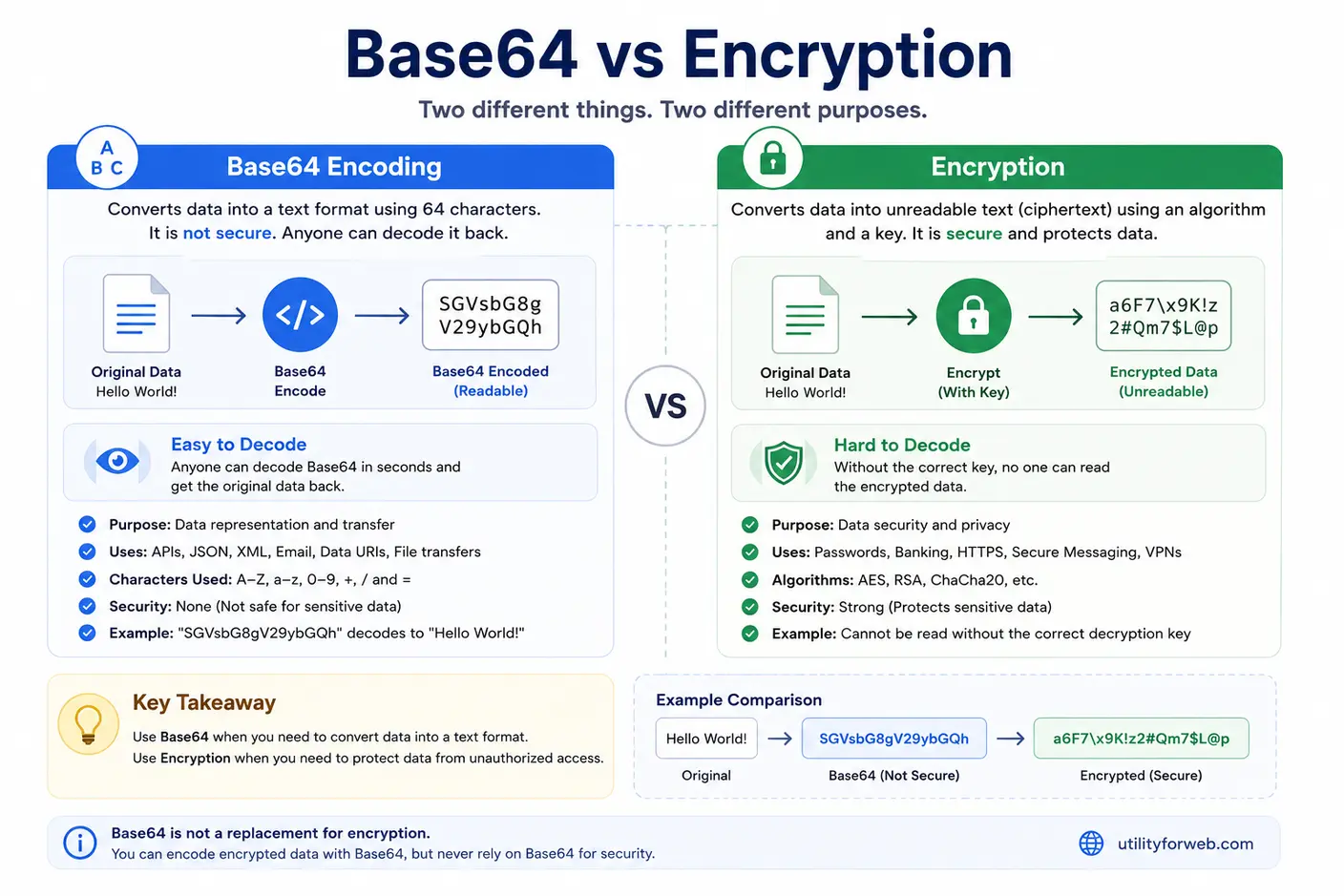
Many people think Base64 encoding and encryption do the same job, but they serve different purposes. A Base 64 Encoder changes data into a text-based format so computers and applications can transfer it safely through systems that only support plain text. Encryption protects sensitive information by converting it into unreadable data that only authorized users can access with the correct key.
When you base64 encode online, anyone can decode the output and recover the original content. Base64 encoding does not hide or secure your data. It simply changes its representation. Encryption, on the other hand, protects data from unauthorized access and keeps confidential information private.
The table below highlights the main differences between Base64 encoding and encryption.
| Feature | Base64 Encoding | Encryption |
|---|---|---|
| Purpose | Converts data into a text-friendly format | Protects sensitive information |
| Security | Does not provide security | Protects data with encryption algorithms and keys |
| Reversible | Anyone can decode the data | Only authorized users with the correct key can decrypt it |
| Common Uses | APIs, JSON, XML, HTML, CSS, Data URIs, email attachments | Passwords, banking systems, secure messaging, file protection |
| Performance | Fast and lightweight | More computationally intensive |
When Should You Use Base64 Encoding?
Use a Base64 encoder when you need to send binary data through text-based systems. For example, developers often convert images, documents, or files into Base64 before including them in JSON, XML, HTML, CSS, or API requests. Base64 encoding improves compatibility and helps preserve the original data during transmission.
When Should You Use Encryption?
Use encryption to protect sensitive or confidential information. Passwords, financial records, personal data, authentication tokens, and sensitive documents should always be encrypted before storage or transmission. Encryption keeps the data unreadable unless someone has the correct decryption key.
Common Uses of Base64 Encoding
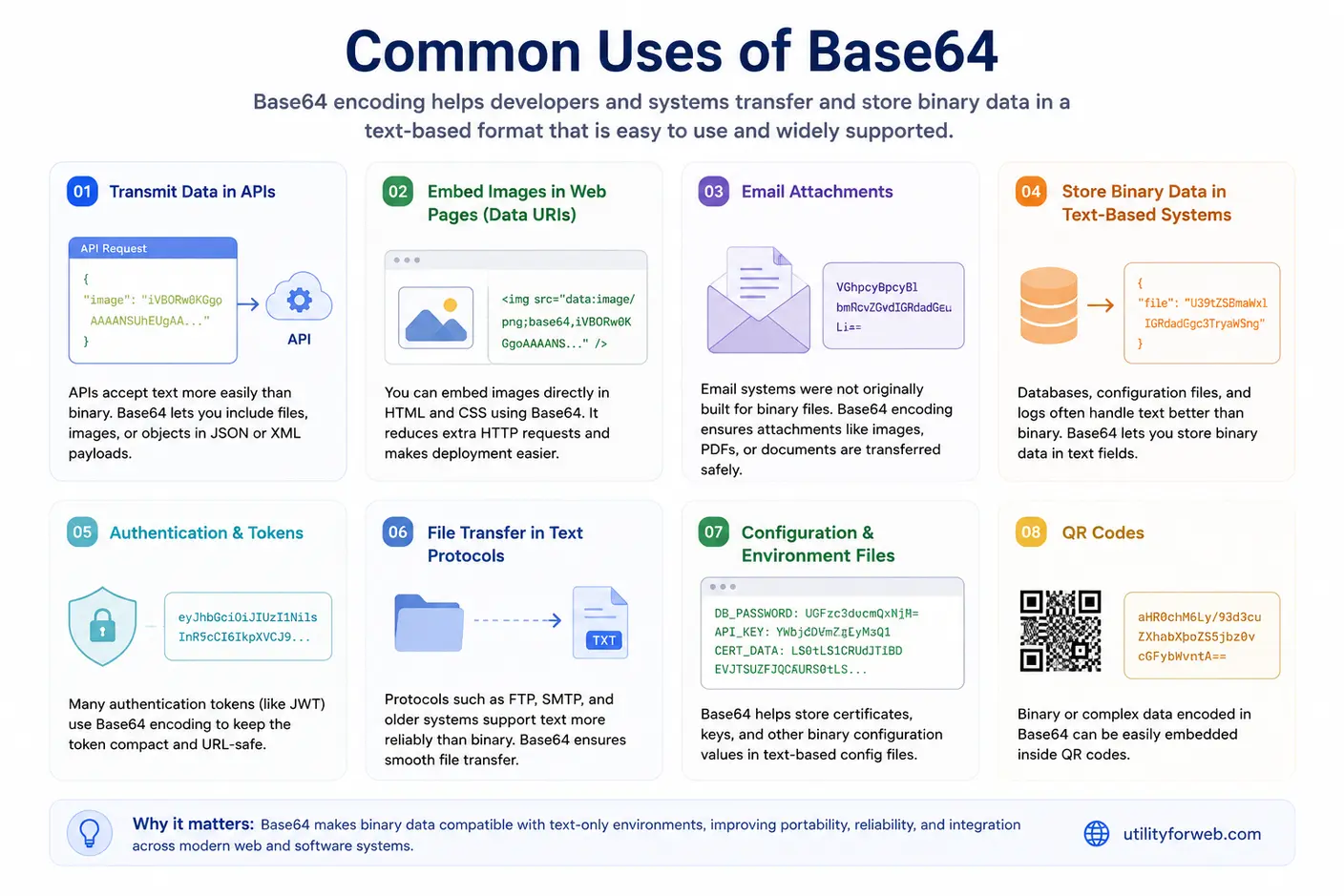
Base64 encoding helps applications move and store binary data in a text format that computers can process easily. A Base 64 Encoder converts files, images, and text into Base64 so they can travel safely through systems that only support plain text. Developers use online Base64 encoders every day because they are fast, reliable, and easy to use.
Whether you need to encode text to Base64, convert an image, or prepare data for an API, Base64 encoding solves many common compatibility problems. Here are some of the most popular ways developers use Base64.
1. Send Binary Data Through APIs
Many REST APIs accept JSON or XML instead of raw binary files. Developers often convert to Base64 online before sending images, documents, or other files in API requests. This approach keeps the data intact during transmission and makes integration easier.
2. Embed Images in HTML and CSS
Web developers use Base64 Data URIs to embed small images, icons, and fonts directly into HTML or CSS files. This technique can reduce additional HTTP requests and simplify deployment for small assets.
3. Transfer Email Attachments
Email systems were originally designed for text, not binary files. Base64 encoding converts images, PDF files, and other attachments into text so email clients can send and receive them without corruption.
4. Store Binary Data in Text-Based Systems
Some databases, configuration files, and log files work better with text than binary data. A Base64 converter transforms binary content into a text format that these systems can store and process reliably.
5. Create Authentication Tokens
Many authentication systems use Base64URL encoding to build JSON Web Tokens (JWTs). The encoded format keeps tokens compact, URL-safe, and easy to transmit between applications.
6. Share Files Through Text Protocols
Some communication protocols and legacy systems support text more reliably than binary data. Base64 encoding allows developers to transfer files without changing the original content.
7. Store Configuration Data
Applications often store certificates, encryption keys, and binary configuration values as Base64 strings. This method keeps configuration files readable while preserving the original binary information.
8. Generate QR Codes and Data URIs
Developers sometimes convert text or binary content into Base64 before embedding it inside QR codes, Data URIs, or other portable formats. This approach improves compatibility across different platforms and applications.
Why Developers Choose a Base64 Encoder
A Base 64 Encoder offers a simple way to convert binary data into plain text without changing the original information. You can base64 encode online in seconds, copy the output instantly, and use it in APIs, HTML, CSS, JSON, XML, email messages, and many other applications. Since the conversion happens directly in your browser, you can work faster without installing additional software.


Frequently Asked Questions
What is a Base 64 Encoder?
A Base 64 Encoder converts plain text, files, or binary data into a Base64 string by using a standard set of 64 printable characters. Developers rely on Base64 encoding to transfer data safely through systems that accept only text, such as APIs, email messages, JSON, and XML. Our online Base64 Encoder lets you encode data instantly without installing software or creating an account.
Why do people use Base64 encoding?
Developers use Base64 encoding to convert binary data into plain text before sending or storing it. This process helps preserve the original data when working with email attachments, REST APIs, JSON payloads, XML files, HTML documents, and Data URIs. If you need to encode Base64 online, this tool provides a fast and reliable solution.
Is Base64 encoding the same as encryption?
No. Base64 encoding changes the format of your data, but it does not protect or hide it. Anyone can restore the original content by using a Base64 decoder. If you need to secure confidential information, encrypt the data before transmitting or storing it.
Can I decode Base64 back to the original data?
Yes. Base64 encoding is fully reversible. After you encode text or binary data, you can use a Base64 decoder to recover the original content without losing information, provided the encoded string remains unchanged.
Why does Base64 make data larger?
Base64 encoding increases the size of the original data because it represents every three bytes with four printable characters. As a result, the encoded output is typically about one-third larger than the source data. Although the file grows in size, the data becomes much easier to transmit through text-based systems.
Can I encode files with a Base64 Encoder?
Yes. A Base64 Encoder can convert many file types, including images, PDFs, ZIP archives, documents, audio files, and other binary content. Developers often encode files before embedding them in JSON, XML, HTML, or API requests.
Is Base64 encoding secure?
No. Base64 encoding improves compatibility, not security. It simply converts data into another readable format. Anyone with access to the encoded text can decode it easily. If you need privacy or data protection, use encryption instead of Base64 encoding.
Why do APIs use Base64 encoding?
Many APIs exchange information in JSON or XML, which support text rather than raw binary data. Base64 encoding allows developers to include images, documents, or other binary files inside API requests without corrupting the content during transmission.
Can I encode Unicode or UTF-8 text?
Yes. Most modern Base64 encoders support UTF-8 and Unicode characters. You can safely encode text written in English, Hindi, Chinese, Arabic, emojis, and many other languages while preserving every character.
Which characters does Base64 use?
The standard Base64 alphabet contains 64 printable characters:
- Uppercase letters (A-Z)
- Lowercase letters (a-z)
- Numbers (0-9)
- Plus sign (+)
- Forward slash (/)
Some encoded strings also end with the equals sign (=), which serves as padding.
What is Base64URL?
Base64URL is a modified version of Base64 designed specifically for URLs and filenames. Instead of using "+" and "/", it replaces them with "-" and "_". Many applications also remove the "=" padding characters. JWT tokens and modern web applications commonly use this format.
Why do some Base64 strings end with "="?
The "=" character acts as padding. It helps make the encoded output length divisible by four characters, which allows decoders to reconstruct the original data correctly. Depending on the input length, you may see one, two, or no padding characters.
Does Base64 distinguish between uppercase and lowercase letters?
Yes. Base64 treats uppercase and lowercase letters as different characters. Changing the case of any letter changes the encoded value and usually produces incorrect or invalid output when decoding.
How does Base64 differ from hexadecimal encoding?
Both methods convert binary data into text, but they work differently. Base64 uses 64 printable characters and produces shorter output. Hexadecimal encoding uses only sixteen characters (0-9 and A-F), which makes it easier to read but less space-efficient.
Can I embed Base64 data inside HTML or CSS?
Yes. Many developers embed small images, icons, fonts, and other assets directly into HTML or CSS by using Base64 Data URIs. This technique can reduce additional HTTP requests and improve page loading performance for small resources.
Why do JWT tokens use Base64URL?
JWT (JSON Web Token) stores its header, payload, and signature by using Base64URL encoding. This format keeps the token URL-safe and easy to transmit through HTTP headers, query parameters, and browser requests.
Does Base64 reduce file size?
No. Base64 encoding increases file size instead of reducing it. If you want to make files smaller, compress them with ZIP or GZIP first. After compression, you can encode the compressed file into Base64 if your application requires it.
Is this online Base64 Encoder free to use?
Yes. You can use our free online Base64 Encoder without paying any fees or creating an account. Simply paste your text or upload supported data, click the Encode button, and copy the generated Base64 string. The tool works directly in your browser, making Base64 encoding online fast, convenient, and easy.