URL Encoder – Encode URL Online
What Is URL Encoding?
URL encoding is the process of converting characters that cannot be safely used in a URL into a format that web browsers and servers can handle correctly. The encoded representation uses a percent sign (%) followed by hexadecimal digits.
For example, a space can be represented as %20, while characters such as &, ?, and # may need encoding when they appear as data inside a URL.
URL encoding is also called percent-encoding because encoded characters are represented using a % followed by hexadecimal values.
- Reserved Characters:
?,:,/,#, and&conveys special meaning in URL formation hence the user cannot place them directly without encoding or escaping it. - Unsafe Characters:
Space,{,},<,>are common unsafe characters that must be encoded before using them inside URLs. - Non-ASCII Characters: Lastly, You must not include Non-ASCII characters directly into the URL without encoding them.
URL Encoding Example
URL encoding becomes easier to understand when you see how ordinary text changes into an encoded value. Suppose you want to include the following text in a URL:
Hello World & Welcome!
The space and special characters can have a specific meaning within a URL, so they need to be represented safely when used as data. A URL encoder converts these characters into their percent-encoded forms.
Original text:
Hello World & Welcome!
URL encoded text:
Hello%20World%20%26%20Welcome%21
In URL encoding, %20 is used for a space, %26 encodes the ampersand (&), and %21 stands for the exclamation mark (!).
For example, if you want to pass a search term as a query parameter, you could have:
https://example.com/search?q=Hello%20World%20%26%20Welcome%21
Without correct URL encoding, characters like & can be treated as URL delimiters rather than as part of the intended search query.
| Original value | Encoded value |
|---|---|
| Hello World | Hello%20World |
| hello & goodbye | hello%20%26%20goodbye |
| price > 100 | price%20%3E%20100 |
| John's profile | John%27s%20profile |
| C++ Developer | C%2B%2B%20Developer |
| search?value | search%3Fvalue |
You can use our URL Encoder to quickly convert text or URL parameter values into their encoded form without manually looking up the corresponding hexadecimal values.
How URL Encoding Works
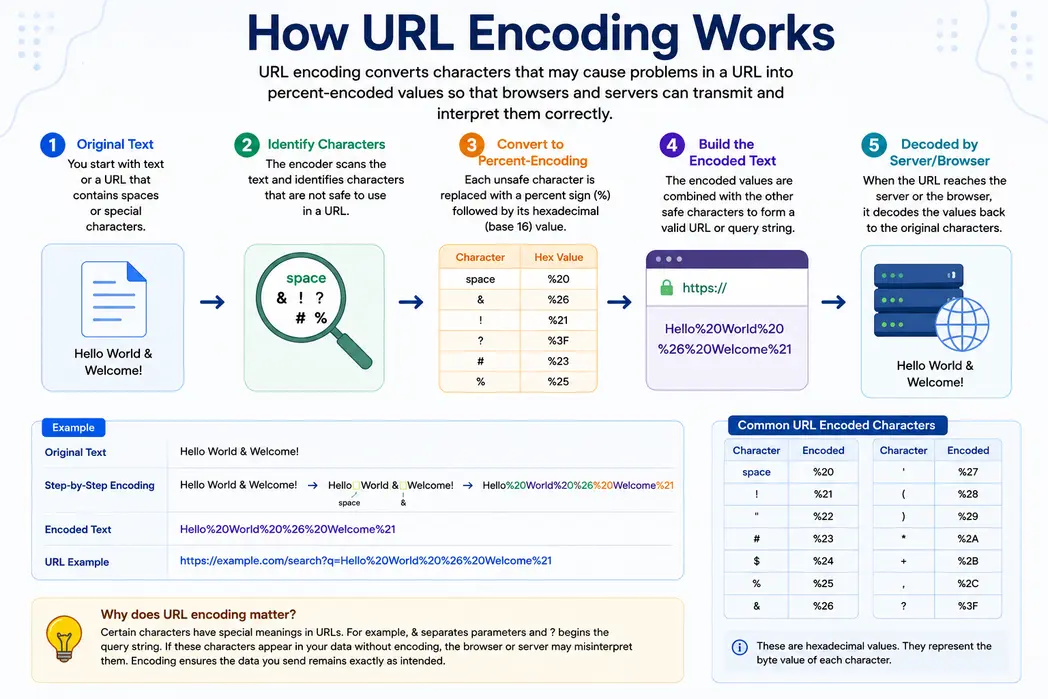
URL encoding converts text and special characters into a format that can be safely used in web addresses, query strings, and web requests. A URL encoder uses percent-encoding to represent characters that may have a special meaning within a URL. The encoded value uses a percent sign (%) followed by two hexadecimal digits.
The process begins with the original text or URL. The encoder detects spaces and special characters like &, ?, # that need to be converted into a URL-safe format. It then replaces these characters with their corresponding encoded values. For example, a space becomes %20, an ampersand becomes %26, and a question mark becomes %3F.
For example, the text Hello Utility For Web & Welcome! becomes Hello+Utility+For+Web+%26+Welcome%21 after encoding. This format allows the data to be included in a URL without changing the intended meaning of the URL structure.
You can encode URL online values when working with query parameters, API requests, dynamic links, form data, or web applications. If you already have an encoded value, the reverse process is URL decoding. URL encode decode operations allow you to convert data between its original and percent-encoded forms.
URL encoding is not encryption. It only changes how characters are represented and does not protect sensitive information.
Why Use a URL Encoder?
A URL encoder can be useful when you need to:
- Encode spaces and special characters in URL parameters
- Prepare query-string values for web requests
- Handle non-ASCII characters in URLs
- Convert text into a URL-safe representation
- Test API requests and web applications
- Encode user-provided values before adding them to a URL
- Troubleshoot incorrectly formatted URLs
- Copy the text that you wish to encode.
- Once copied, open https://www.utilityforweb.com/url-encode/
- Paste the content you copied into the first text area on the screen.
- Click "Encode URL" button to start the process.
- Check the affair and click on
Copy to clipboardto copy.


Frequently Asked Questions
What is URL encoding?
URL encoding converts characters that may cause problems in a web address into percent-encoded values. It allows spaces, special characters, and other data to be represented safely in URLs, query strings, and web requests.
How do I encode a URL online?
To encode a URL online, enter or paste your text or URL into the URL Encoder and click the Encode button. The tool converts characters that require encoding and provides the result for you to copy and use.
What is a URL encoder?
A URL encoder is a tool that converts characters into a percent-encoded format that can be safely used in URLs. It is useful when working with spaces, special characters, query parameters, and dynamically generated web addresses.
Why do URLs need to be encoded?
URLs need encoding when they contain characters that can be interpreted as part of the URL structure or cannot be represented safely. Encoding helps preserve the intended data when it is transmitted through browsers, servers, APIs, and web applications.
What is the correct way to convert special characters into URL-safe characters?
You can encode special characters in a URL by converting them into their percent-encoded values. For example, a space becomes %20, an ampersand becomes %26, and a question mark becomes %3F.
What does %20 mean in a URL?
The %20 code is used in a URL to represent a space. You will commonly see it when spaces are included in URL paths, query parameters, or other URL components.
Should spaces in URLs be encoded as %20 or +?
Both %20 and + can represent a space in certain contexts, but they are not universally interchangeable. %20 is the percent-encoded form of a space, while + is commonly used for spaces in form-style URL encoding.
How does URL encoding differ from the process of URL decoding?
URL encoding converts characters into percent-encoded values, while URL decoding reverses that process. For example, URL encoding changes Hello World to Hello%20World, while decoding converts it back to the original text.
How do I decode a URL after encoding it?
You can decode an encoded URL by using a URL Decode tool. Paste the percent-encoded value into the decoder, and it will convert encoded characters back into their original representation.
What characters need to be URL encoded?
Characters that have a reserved meaning in URLs or cannot be safely represented may need encoding. Common examples include spaces, ampersands, question marks, hash symbols, plus signs, and certain non-ASCII characters.
What is percent-encoding?
Percent-encoding is the method used to represent characters in URLs with a percent sign followed by two hexadecimal digits. For example, a space is represented as %20 and an ampersand as %26.
Should I encode the entire URL or only the URL parameter?
In many cases, you should encode the value being placed into a URL parameter rather than encoding the entire URL. Encoding the complete URL without considering its individual components can also encode characters such as :, /, and ? that define the URL structure.
How do encodeURI() and encodeURIComponent() differ in JavaScript?
In JavaScript, encodeURI() is designed for encoding a complete URI while preserving characters that form its structure. encodeURIComponent() encodes an individual component, such as a query parameter value, and therefore encodes more characters.
How do I URL encode query parameters?
Encode each query parameter value before adding it to the URL. This is especially important when a value contains spaces, symbols, or other characters that could be interpreted as URL syntax. A URL encoder can quickly convert the parameter value into the required format.
Why does my URL contain %2520 instead of %20?
%2520 usually indicates that a value containing %20 has been encoded a second time. During the second encoding, the percent sign becomes %25. This is known as double URL encoding.
Does URL encoding encrypt or secure data?
No. URL encoding does not encrypt or secure information. It only changes the representation of characters so they can be used correctly in a URL. Sensitive information should be protected with appropriate security and encryption methods.
How does URL encoding handle Unicode and non-English characters?
URL encoding can represent Unicode characters using their UTF-8 byte values and percent-encoded notation. This allows text containing characters from different languages and writing systems to be represented correctly in URLs.
Can I use a URL encoder for API requests and query strings?
Yes. A URL encoder can help prepare query parameter values and other URL data for API requests. Encoding the required values helps prevent spaces and special characters from interfering with the structure of the request.