What Is a Slug Generator and Why Do I Need One?
If you have ever published a blog post, created a product page, or worked with a website CMS, you have probably seen URLs such as:
https://example.com/blog/what-is-a-slug-generator
The final part of this URL — what-is-a-slug-generator — is called a slug.
A well-written slug may look simple, but it plays an important role in creating readable, organized, and SEO-friendly URLs. The problem is that creating clean slugs manually can become repetitive and time-consuming, particularly when you work with dozens or hundreds of pages.
That is where a slug generator can help.
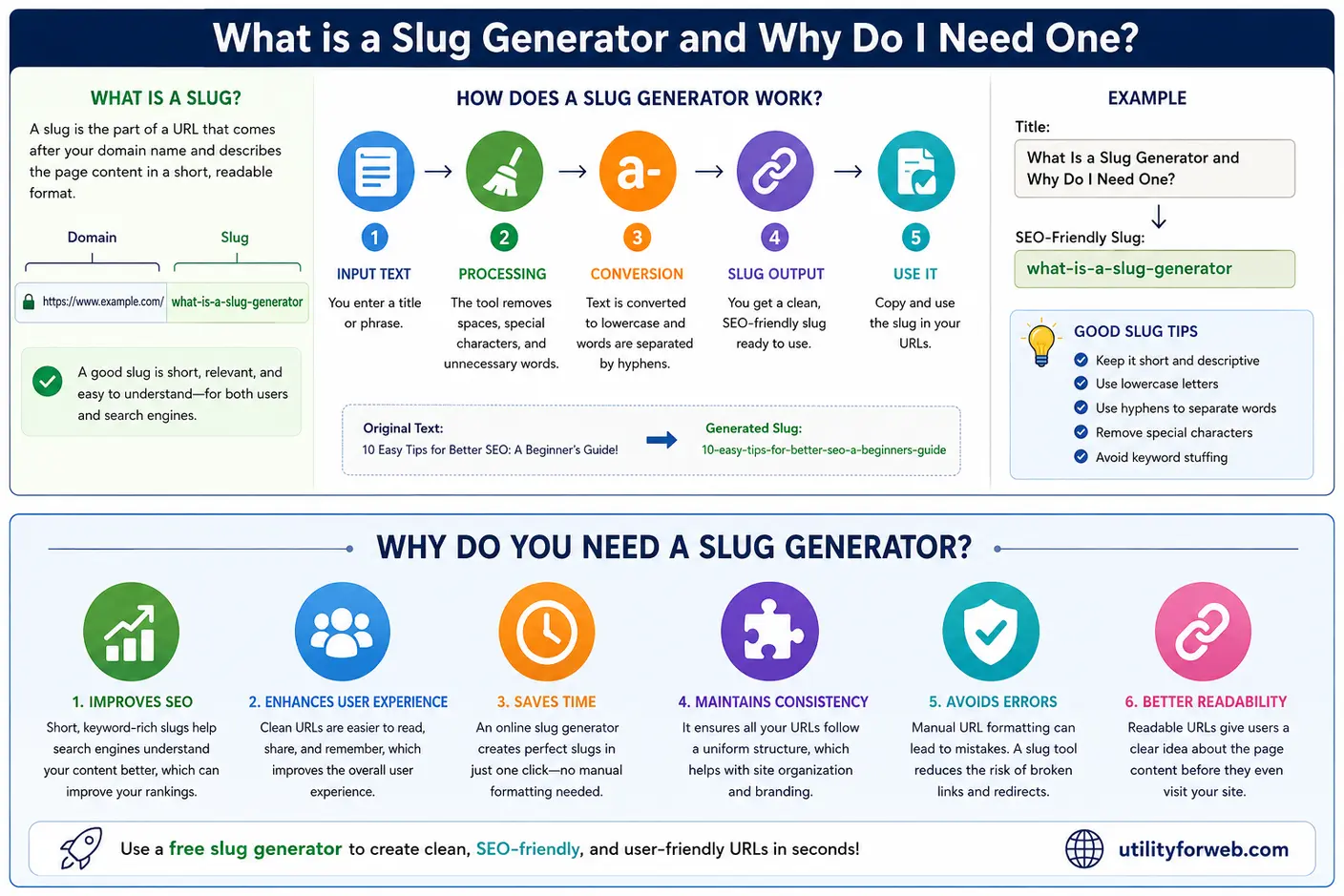
A slug generator automatically converts a title, sentence, or piece of text into a clean, URL-friendly format. It can remove unnecessary characters, convert text to lowercase, replace spaces with hyphens, and produce a slug that is easier for people and search engines to understand.
In this guide, we will explain what a slug is, what a slug generator does, how it works, why URL slugs matter for SEO, and why using a free slug generator can make managing website URLs much easier.
What Is a URL Slug?
A URL slug is the descriptive portion of a web address that identifies a particular page.
For example: https://example.com/blog/what-is-a-slug-generator
In this URL, the slug is: what-is-a-slug-generator
Instead of using a complicated URL such as: https://example.com/blog/page?id=12345
a descriptive slug provides users with an immediate idea of what the page is about.
For example: What Is a Slug Generator and Why Do I Need One?
SEO-friendly slug: what-is-a-slug-generator
The slug is short, readable, and directly related to the page topic. A good URL slug should generally be descriptive, concise, easy to read, and relevant to the content of the page.
What Is a Slug Generator?
A slug generator is a tool that converts ordinary text into a URL-friendly slug.
Suppose your article title is: How to Create SEO-Friendly URLs for Your Website!
A slug generator can turn it into: how-to-create-seo-friendly-urls
The tool takes care of formatting tasks that you would otherwise have to perform manually. Depending on the tool, the conversion process can include:
- Converting uppercase letters to lowercase
- Removing unnecessary spaces
- Removing punctuation and special characters
- Replacing spaces with hyphens
- Cleaning unwanted characters
- Producing a readable URL slug
- Converting a slug back into readable text
This makes a slug maker useful for bloggers, developers, SEO professionals, marketers, website owners, and anyone who regularly creates web pages.
How Does an Online Slug Generator Work?
An online slug generator generally follows a simple sequence of transformations. Imagine that you enter: 10 Easy Tips for Better SEO: A Beginner's Guide!
The generator processes the text and creates something similar to: 10-easy-tips-for-better-seo-a-beginners-guide
The basic process usually looks like this.
- Start With Your Text: First, enter the title, sentence, or text that you want to convert. For example:
How to Build a Website in 2026 -
Convert the Text to Lowercase: The text is converted into lowercase characters:
how to build a website in 2026Lowercase URLs are generally easier to maintain consistently.
-
Remove Unnecessary Characters: Punctuation and special characters that do not belong in the slug are removed.
For example:
how to build a website in 2026!becomes
how to build a website in 2026 -
Replace Spaces With Hyphens: Spaces are converted into hyphens:
how-to-build-a-website-in-2026Hyphens make individual words easier to distinguish in a URL.
-
Generate the Final Slug: The result is a clean, URL-friendly slug that can be used as part of your webpage address.
This automated process takes only a few seconds and avoids repeatedly formatting URLs by hand.
Why Do You Need a Slug Generator?
You may be wondering whether you actually need a slug generator. After all, creating a slug manually is not particularly difficult.
For one or two pages, manual formatting is perfectly possible.
But consider managing a website with 50, 100, or 1,000 pages.
Manually reviewing every title, removing special characters, changing capitalization, replacing spaces, and checking the final URL can become tedious. It also increases the possibility of inconsistent formatting.
Here are some of the main reasons to use a slug generator.
1. Create SEO-Friendly URLs Faster
URLs provide contextual information about a webpage.
Compare these two examples: example.com/page?id=7284 and example.com/seo-friendly-url-guide
The second URL is immediately easier to understand. A descriptive URL can help users understand what a page is about before opening it. Search engines can also use words in URLs as one of many signals for understanding page content.
A free slug generator makes it easier to create descriptive URLs without spending unnecessary time formatting them manually. Keep in mind that a good slug alone does not guarantee higher rankings. SEO depends on many factors, including content quality, relevance, technical SEO, links, page experience, and search intent.
2. Save Time
Time savings are one of the biggest advantages of using an online slug generator. Imagine you have the following title: The Complete Guide to Building Fast and SEO-Friendly Websites
Manually converting it means you need to:
- Change the capitalization.
- Remove unnecessary punctuation.
- Check spaces.
- Replace spaces with hyphens.
- Review the final result.
A slug generator can perform these transformations almost instantly. This becomes especially useful for content teams, SEO agencies, developers, and bloggers who create pages regularly.
3. Keep URLs Consistent
Website consistency matters. One page might accidentally use: /What-Is-SEO
while another uses: /what-is-seo
and another uses: /what_is_seo
A consistent slug-generation process can help prevent these differences. For example, using: what-is-seo
as your standard format creates a predictable URL structure across your website. Consistency also makes URLs easier to manage when your site grows.
4. Improve URL Readability
A URL should ideally give users some indication of what they will find on the page. Consider: example.com/blog/seo-guide
compared with: example.com/blog/article-82917
The first URL communicates useful information immediately. Readable URLs can be easier to remember, copy, share, and understand. A URL slug generator helps transform ordinary page titles into this type of readable structure.
5. Reduce Manual Formatting Errors
When you create slugs manually, it is easy to overlook a character or accidentally include unnecessary spaces. For example: How to Use HTML & CSS: A Beginner's Guide!
could accidentally become: How-to-Use-HTML-&-CSS-A-Beginners-Guide!
A text to slug converter can automatically clean the input and produce something closer to: how-to-use-html-css-a-beginners-guide. Automating repetitive formatting reduces the chance of small mistakes.
What Makes a Good URL Slug?
A good slug does not need to contain every word from your page title. Instead, focus on the words that communicate the page topic.
For example, Page title What Is a Slug Generator and Why Do I Need One? should have slug what-is-a-slug-generator. The URL is short and descriptive.Here are some useful slug best practices:
- Keep Slugs Short and Descriptive: Avoid turning an entire article title into an extremely long URL. Instead of
what-is-a-slug-generator-for-my-website-and-seo, you could usewhat-is-a-slug-generator - Use Lowercase Characters: Lowercase slugs provide a consistent URL format and can help avoid potential case-related URL inconsistencies.
- Use Hyphens Between Words: Use
free-slug-generatorrather thanfree_slug_generator. Hyphens provide clear word separation in URLs. -
Remove Unnecessary Special Characters: Characters such as punctuation and symbols generally do not add useful information to a basic descriptive slug.
For example:
Best SEO Tools! 2026can becomebest-seo-tools-2026 -
Avoid Keyword Stuffing: A slug should describe the page, not contain a long list of keywords.
For example,
slug-generator-free-slug-maker-online-slug-generator-best-slug-toolis unnecessarily repetitive. A better option isfree-slug-generator. Use the primary topic naturally and keep the URL useful for humans.
Slug Generator vs. Manual Slug Creation
Both approaches can work. Manual slug creation gives you complete control, but it requires you to perform each formatting step yourself. While a slug maker automates repetitive tasks.
| Feature | Manual Creation | Slug Generator |
|---|---|---|
| Lowercase conversion | Manual | Automatic |
| Remove special characters | Manual | Automatic |
| Replace spaces | Manual | Automatic |
| Consistent formatting | Depends on user | Easier to maintain |
| Speed | Slower for large volumes | Very fast |
| Human review | Required | Recommended |
| Bulk content workflows | Less convenient | More convenient |
For occasional use, manual formatting may be sufficient. For frequent content creation, an online tool can save considerable time.
Who Can Benefit From a Slug Generator?
A slug generator is useful for almost anyone who creates or manages web content.
- Bloggers: Bloggers can quickly turn article titles into clean URL slugs before publishing posts.
- SEO Professionals: SEO specialists can create concise, keyword-relevant URLs while working on website optimization.
- Developers: Developers often need to generate slugs dynamically for routes, blog posts, products, categories, and database records.
- Website Owners: Small business owners can create cleaner URLs without needing to understand every technical detail of URL formatting.
- eCommerce Businesses: Product and category pages can benefit from consistent, descriptive URL structures.
- Content Teams: Teams producing large amounts of content can use a standardized slug-generation process to maintain consistency across publications.
Can You Convert a Slug Back to Text?
Some slug tools offer a reverse operation commonly known as slug to title case. For example free-slug-generator can be converted into Free Slug Generator.
This can be useful when you need to turn a URL-friendly value back into a readable title. A tool that supports both directions can therefore be useful for developers and content managers who frequently move between page titles and URL slugs.
How to Use a Free Slug Generator
Using a free slug generator is usually straightforward. With UtilityForWeb's online slug generator, you can enter text and convert it into a clean slug in a few steps.
- Copy your title or text.
- Open the online slug generator.
- Paste your text into the input field.
- Select the Text to Slug option.
- Review the generated slug.
- Copy the result and use it in your URL.
The UtilityForWeb tool also supports converting a slug back into title-case text. The tool is available online without requiring registration, making it convenient for quick URL formatting tasks.
Are Slugs Important for SEO?
Yes, but it is important to put their SEO value into perspective.
An SEO-friendly URL can make a webpage easier to understand for both users and search engines. Descriptive words in a URL provide additional context about the page. UtilityForWeb's current slug-generator guidance likewise emphasizes readable, descriptive slugs and the use of relevant keywords.
However, changing or optimizing a slug should not be treated as a shortcut to higher rankings.
A great slug cannot compensate for poor content.
For example, a page with an excellent URL can still perform poorly if it does not satisfy search intent, provide useful information, or offer a good user experience.
Think of the slug as one small but useful part of a larger SEO strategy.
Should You Change an Existing URL Slug?
Be careful when changing URLs on an established website.
If a page has already been indexed, linked to, or shared, changing its slug can change the URL. This can potentially create broken links and other SEO problems if the old URL is not properly redirected.
Before changing an existing slug, consider:
- Whether the URL already receives organic traffic
- Whether other websites link to it
- Whether it has been indexed
- Whether internal links point to it
- Whether a redirect should be implemented
- Whether the change provides a meaningful benefit
For new pages, it is generally easier to choose an appropriate slug before publication.
Why Use an Online Slug Generator Instead of Installing Software?
For occasional slug-generation tasks, an online tool can be more convenient than installing software or writing custom code.
An online slug generator can be accessed directly from a browser, which means you can use it from different devices without setting up a development environment.
This is particularly useful when you simply need to convert a title into a clean URL and do not want to write a script to perform the transformation.
For developers who need automated slug generation inside an application, however, a programming library or framework-specific solution may be more appropriate.
Final Thoughts
A slug may be a small part of a URL, but it contributes to how organized, readable, and understandable your website addresses are.
A slug generator makes the process of creating these URLs faster and more consistent. Instead of manually converting text, removing special characters, changing capitalization, and replacing spaces with hyphens, you can let an automated slug maker handle the repetitive formatting.
Whether you are a blogger creating a new article, an SEO professional optimizing URLs, a developer building a CMS, or a business owner managing a website, a free slug generator can be a simple addition to your workflow.
For quick URL formatting, you can use the free UtilityForWeb Text to Slug tool to convert text into clean, readable slugs and convert slugs back into title-case text. The key is not to create complicated URLs filled with keywords. Instead, aim for slugs that are short, descriptive, readable, consistent, and relevant to the page content.
A clean URL is easier to understand — and a good slug generator makes creating one much easier.