URL Decoder
What Is URL Decoding?
URL decoding is the process of converting URL-encoded data back into a more readable form. When a URL contains spaces, special characters, or other characters that cannot be used directly in certain parts of a web address, they may be represented using percent encoding. A URL decoder reverses this process and converts those encoded values back into the characters they represent.
For example, a space is commonly represented as %20 in an encoded URL. When you decode the URL, %20 is converted back into a space. Similarly, %3F represents a question mark (?), while %26 represents an ampersand (&).
URL decoding is useful when you need to inspect an encoded web address, read URL parameters, troubleshoot a web request, or understand data passed between a browser and a server. Instead of manually identifying each percent-encoded value, you can use a URL decoder online to convert the encoded text into a readable result within seconds.
URL encoding and URL decoding work as opposite operations. URL encoding changes characters into a format suitable for use in a URL, while URL decoding converts those encoded characters back to their corresponding representation. This is especially helpful when working with query strings, API requests, redirects, and dynamically generated URLs.
| Encoded Value | Decoded Character |
|---|---|
%20 |
Space |
%21 |
! |
%26 |
& |
%2F |
/ |
%3D |
= |
%3F |
? |
For instance, the encoded text hello%20world%21 becomes hello world! after decoding. This conversion does not decrypt the data or change its underlying meaning. It simply replaces valid percent-encoded sequences with the characters they represent.
If you frequently work with encoded links or URL parameters, a URL decoder can save time and reduce manual errors. You can paste a URL-encoded value into an online decoder, decode the content, and copy the resulting text for further use or analysis.
How Does a URL Decoder Work?
A URL decoder works by identifying percent-encoded sequences within a URL or text and converting them back into the characters they represent. Each encoded sequence consists of a percent sign (%) followed by two hexadecimal digits. For example, %20 represents a space, while %3F represents a question mark.
When you use a URL decoder online, the tool examines the input for valid encoded sequences and processes them according to URL decoding rules. It then replaces those sequences with their corresponding characters and returns the decoded result. This makes it much easier to read URLs, query strings, and other URL-encoded data.
The URL Decoding Process
A typical URL decoding process follows these basic steps:
- Read the input: The decoder receives a URL or text containing URL-encoded data.
- Find encoded sequences: It looks for a percent sign followed by two hexadecimal characters, such as
%20or%2F. - Convert the values: Each valid percent-encoded sequence is converted to the character represented by its hexadecimal value.
- Rebuild the result: The decoded characters are combined with the remaining input to produce the readable URL or text.
- Display the output: The completed decoded value is shown so it can be reviewed, copied, or used elsewhere.
For example, consider the following encoded URL:
https%3A%2F%2Fexample.com%2Fhello%20world%3Fpage%3D1
A URL decoder identifies the encoded portions and converts them into their corresponding characters:
https://example.com/hello world?page=1
In this example, %3A becomes :, %2F becomes /, %20 becomes a space, %3F becomes ?, and %3D becomes =.
How Percent Encoding Is Decoded
Percent encoding represents a character using its byte value written as two hexadecimal digits after a percent sign. During decoding, the URL decoder interprets these hexadecimal values and converts them back into the appropriate characters.
For example:
| Encoded Value | Decoded Character |
|---|---|
%20 |
Space |
%2F |
/ |
%3A |
: |
%3D |
= |
%3F |
? |
%26 |
& |
What Happens to URL Parameters?
URL parameters often contain values that have been encoded to safely pass data through a web address. A decoder can convert these URL parameters into a more readable form without changing the intended data.
For example, an encoded query parameter might look like this:
?search=web%20development&category=url%20tools
After decoding, it becomes:
?search=web development&category=url tools
This can be particularly useful when debugging web applications, inspecting API requests, analyzing links, or checking values passed through query strings.
Can a URL Decoder Decode Multiple Layers?
Some URLs contain data that has been encoded more than once. For example, %2520 can decode to %20 after one pass. A second decoding step can then convert %20 into a space. This situation is commonly referred to as double URL encoding.
Whether additional decoding is appropriate depends on how the original data was generated. Repeatedly decoding content without understanding its source can produce an unintended result, so each decoding step should be performed only when another layer of encoding is actually present.
Overall, a URL decoder does not decrypt or alter the underlying information. It simply reverses valid URL encoding and converts percent-encoded values into the characters they represent. This makes an online URL decoding tool useful whenever encoded web addresses or URL data need to be inspected in a human-readable format.
URL Encoding vs URL Decoding
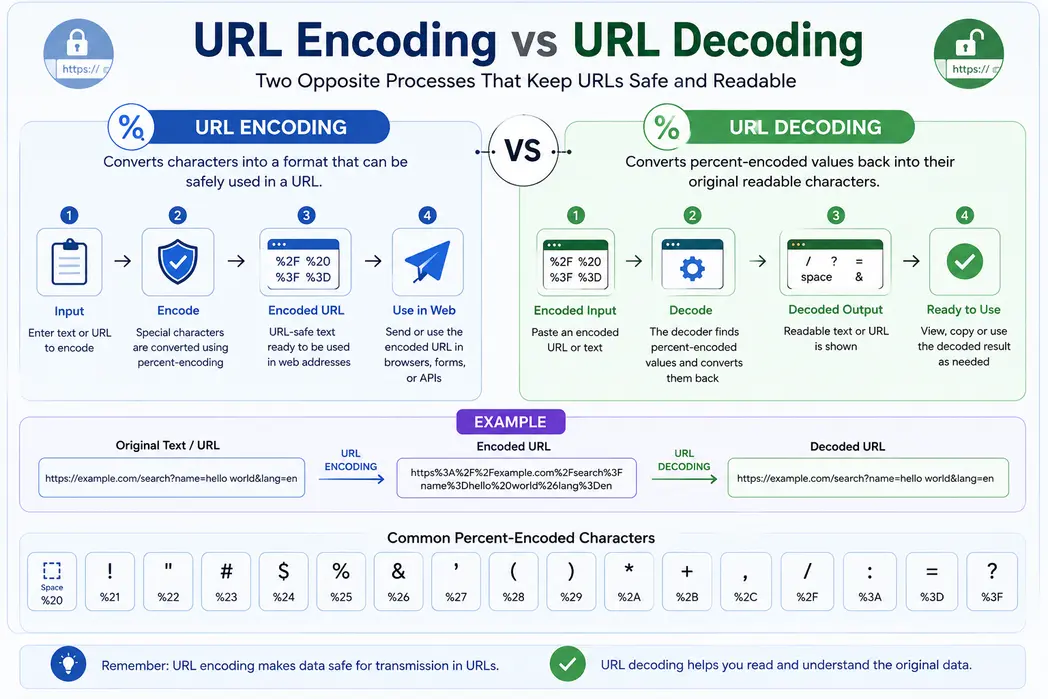
URL encoding and URL decoding work in reverse to safely represent and interpret data used in web addresses. Encoding converts certain characters into a URL-safe representation, while decoding converts that encoded representation back into its corresponding characters.
These operations are commonly used when passing information through URLs, query strings, web forms, and API requests. If a URL contains spaces or characters with a special meaning, those values may be represented using percent encoding. A URL decoder can convert those encoded values back to their original form when you need to view or analyze the underlying data.
| URL Encoding | URL Decoding |
|---|---|
| Converts characters into an encoded format | Converts encoded values back into characters |
| Prepares data for use in a URL | Makes encoded URL data easier to read |
Turns a space into %20 |
Turns %20 back into a space |
| Uses percent-encoded sequences where required | Interprets valid percent-encoded sequences |
| Useful when constructing URLs and requests | Useful when inspecting or troubleshooting URLs |
How URL Encoding Works
When a character cannot be used directly in a particular part of a URL, it can be represented using percent encoding. The character is converted into a hexadecimal value and written after a percent sign.
For example, a space can be represented as %20, an ampersand as %26, and a question mark as %3F.
Suppose you want to include the text hello world as part of a URL. The encoded version can be represented as:
hello%20world
This representation allows the value to be passed as URL data without the space being treated as an actual part of the URL syntax.
How URL Decoding Works
URL decoding reverses the encoding process. A URL decoder identifies valid percent-encoded sequences and translates their hexadecimal values back into the characters they represent.
For example:
hello%20world%21
becomes:
hello world!
An online URL decoder can perform these conversions automatically, making it easier to inspect encoded URLs and understand the data contained within them.
URL Encode Decode Example
Consider a URL containing a search parameter:
https://example.com/search?q=hello world
When URL encoding is applied, spaces in parameter values are converted to %20:
https://example.com/search?q=hello%20world
If you receive the encoded URL and want to make its parameter easier to read, you can use a URL decoder online. The decoded result changes the encoded representation back to:
https://example.com/search?q=hello world
This is the basic relationship between URL encode and decode: encoding prepares the data for its URL representation, while decoding interprets that representation and restores the corresponding characters.
When to Use URL Encoding and Decoding?
Use URL encoding when creating or processing a URL that contains characters that need to be represented in an encoded form. This is common when building query strings, submitting form data, or sending parameter values through an API request.
URL decoding helps you read the underlying content of data that has been encoded in a URL. Developers may use it while debugging web applications, examining query parameters, analyzing redirects, or troubleshooting API requests.
It is also important to remember that URL encoding is not encryption. Encoding changes how data is represented, but it does not protect the information from being read. Likewise, using a URL decoder online does not decrypt encrypted content; it only reverses applicable URL encoding.
URL Decoder vs URL Decryption
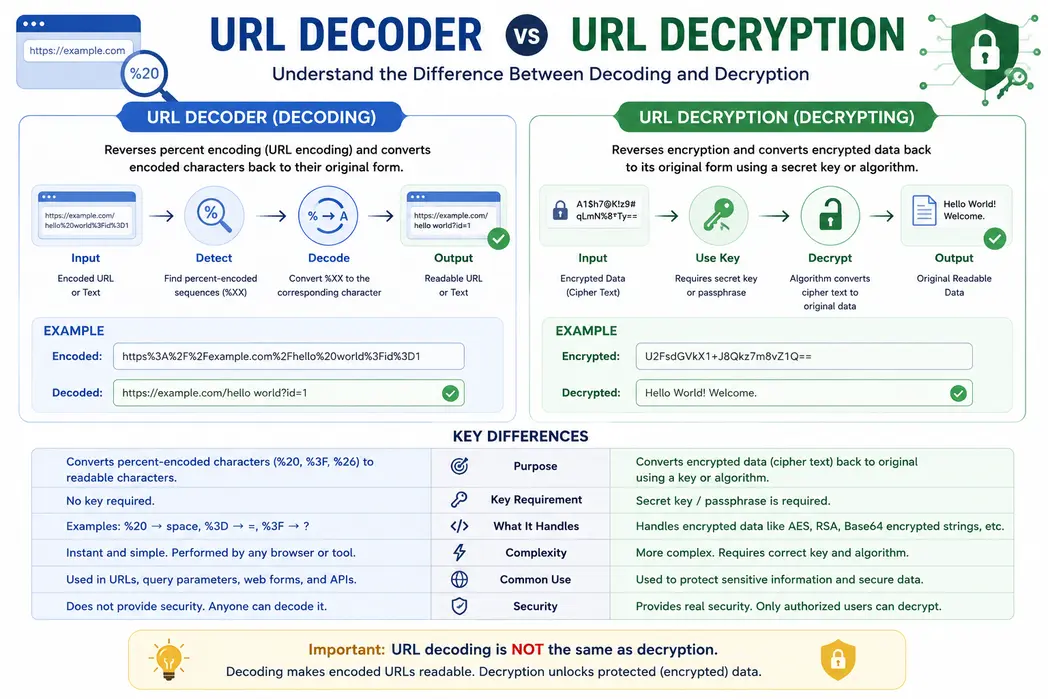
A url decoder and a decryption tool perform very different tasks, even though both can make data easier to understand. URL decoding converts encoded URL characters back into their original representation, making the URL easier to read. For example, %20 represents a space, so a URL encoded value can be converted back to its original characters using a url decoder online. This process is also commonly described as url encode decode. In contrast, decryption is used to recover information protected through an encryption algorithm and normally requires the appropriate key or password. Therefore, you cannot decrypt url online data simply by using a decoder. If you need to decode URL values or inspect URL encoded text, a URL decoder is the appropriate tool, while encrypted data requires a proper decryption method.


Frequently Asked Questions
What is a URL decoder?
A URL decoder is a tool that converts percent-encoded characters in a URL or text back into their readable form. It can turn sequences such as %20, %3F, and %26 into the characters they represent.
How does a URL decoder online tool work?
A URL decoder reads percent-encoded sequences in your input and converts each valid sequence back to its corresponding character. Paste the encoded URL or text into the tool, select the decode option, and the readable result is generated for you.
How can I decode a URL online?
To decode a URL online, paste the encoded URL or URL parameter into the decoder's input field and click the decode button. The tool converts encoded characters such as %20 and %3D into their corresponding characters so you can read the URL more easily.
What do URL encoding and decoding mean?
URL encoding changes characters into a format that can be safely represented within a URL, while URL decoding reverses that conversion. For example, encoding can change a space into %20, and decoding changes %20 back into a space.
What does %20 mean in a URL?
In percent encoding, a space is represented using %20. When a URL containing Hello%20World is decoded, it becomes Hello World.
What do %2F, %3F, %26, and %3D mean in a URL?
These are percent-encoded representations of common URL characters. %2F represents a slash, %3F represents a question mark, %26 represents an ampersand, and %3D represents an equals sign.
What is percent encoding in a URL?
Percent encoding is a method of representing characters using a percent sign followed by two hexadecimal digits. It allows characters that have special meanings or cannot be used directly in certain parts of a URL to be represented safely.
Why do URLs need to be encoded?
URLs have rules about which characters can appear directly in different parts of a web address. Encoding represents spaces, reserved characters, and other values in a form that web browsers and applications can process consistently.
What is the difference between URL decoding and URL decryption?
URL decoding reverses percent encoding and does not require a secret key. Decryption is used to recover information that has been protected with an encryption method. Therefore, decoding an encoded URL does not decrypt encrypted information contained within it.
Can I decrypt a URL online with a URL decoder?
If the URL is only percent-encoded, a URL decoder can make its contents readable. However, a URL decoder cannot decrypt data that has been encrypted with an encryption algorithm. In that situation, you need the appropriate decryption method and key rather than a URL decoding tool.
Why does a URL contain a plus sign instead of a space?
A plus sign can represent a space in data formatted using the application/x-www-form-urlencoded convention, which is commonly used for form submissions and query parameters. In other URL contexts, a plus sign can represent an actual plus character, so its meaning depends on how the data was encoded.
Can a URL decoder handle query parameters?
Yes, URL decoding can be useful for reading encoded query parameters. It can convert values containing percent-encoded characters into a more understandable form, which is helpful when inspecting links, API requests, redirects, or application data.
Can I decode a URL that has been encoded more than once?
Yes, a URL may sometimes contain multiple layers of encoding. In such cases, decoding one layer can reveal another encoded value, such as %2520 becoming %20. Additional decoding may be required to reach the final readable character.
Can a URL decoder handle special or non-English characters?
Yes, properly percent-encoded Unicode text can be decoded back into characters from many languages and writing systems. Characters outside the basic ASCII range are commonly represented through UTF-8 byte sequences before being percent encoded.
What kind of text can I decode with a URL decoder?
A URL decoder can process valid percent-encoded URLs, URL fragments, query-string values, and other text containing URL-encoded characters. It is useful for reading encoded spaces, punctuation, symbols, and other characters represented with percent encoding.
Is this URL decoder free to use?
Yes, this URL decoder is free to use online. You can decode URL-encoded text directly in your browser without installing dedicated URL decoding software.
Does URL decoding change the original URL or text?
URL decoding converts encoded sequences into the characters they represent; it does not intentionally rewrite the underlying content. The decoded result is a readable representation of the encoded data and may look different because characters such as spaces and symbols are no longer represented by percent codes.