How a Free Slug Generator Creates Clean and Readable URLs?
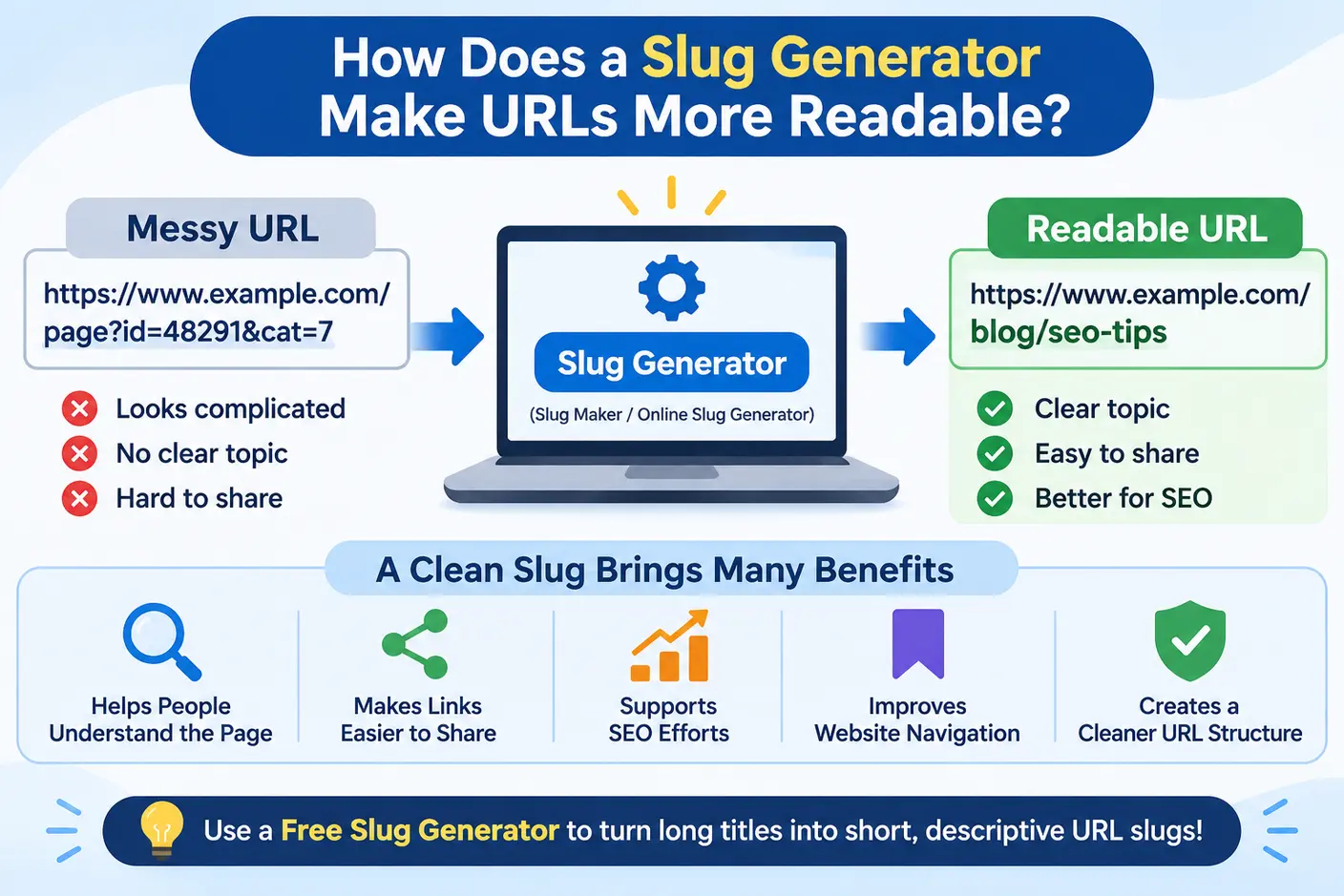
Imagine seeing two website links before opening a webpage:
https://example.com/blog?id=48291&category=7
https://example.com/blog/how-slug-generators-improve-url-readability
The second URL gives you a much clearer idea of what the page contains. Its words describe the topic, making the link easier to understand without opening it.
This is where URL readability becomes important. A descriptive URL can help visitors recognize a page, understand its purpose, and identify relevant links when browsing a website or sharing content with others.
A free slug generator makes creating readable URLs easier by converting ordinary text into a clean, URL-friendly format. Instead of manually adjusting capitalization, removing unnecessary punctuation, and replacing spaces with hyphens, you can let a slug maker handle these repetitive formatting tasks.
In this guide, we will explore how an online slug generator improves URL readability, what makes a good URL slug, how readable URLs support SEO, and which common mistakes you should avoid when creating website addresses.
What Is a URL Slug?
A URL slug is the descriptive part of a web address that identifies a specific webpage. It usually appears at the end of the URL, after the domain name and any directory paths.
For example:
https://example.com/blog/how-to-improve-url-readability
In this example, how-to-improve-url-readability is the slug.
Compare it with a less descriptive address such as:
https://example.com/blog/page?id=48291
The first URL uses recognizable words to describe the page topic, while the second relies on a numerical identifier. A descriptive slug gives visitors useful context before they open the page.
A good URL slug should generally be concise, descriptive, easy to read, and relevant to the page content. It does not need to repeat the complete page title. Instead, it should communicate the main topic in a simple and understandable way.
Why Is URL Readability Important?
People encounter URLs in search results, browser history, emails, social media posts, messages, and website navigation. A readable URL makes it easier to understand what a link represents before visiting the destination.
Here are some important reasons to create readable URLs.
1. Help Visitors Understand the Page Topic
A descriptive URL provides information about the destination. For example, consider these two addresses:
example.com/page/7824
example.com/guides/choosing-a-running-shoe
The second URL suggests that the page explains how to choose running shoes. The first does not provide enough information to identify the topic.
When people can understand a link before opening it, they can make a more informed decision about whether the page is relevant to their needs.
2. Make Links Easier to Scan
Readable URLs use familiar words and clear separators. Clear, descriptive URLs help readers recognize individual words quickly, making the web address easier to understand at a glance.
For example, example.com/online-slug-generator-guide is easier to scan than example.com/onlinesluggeneratorguide.
Hyphens separate the words visually, allowing readers to identify the phrase more quickly. This is particularly useful when a URL contains several words.
3. Make Links Easier to Share
People frequently share website links through emails, messaging apps, social media platforms, and online communities. A descriptive URL can communicate the topic even when the sender does not provide a detailed explanation.
For example, a link containing remote-work-productivity-tips gives readers a better idea of the destination than a link containing only an article ID.
Readable URLs do not guarantee more clicks or shares, but they can make links clearer when people encounter them outside the original website.
4. Support Website Navigation
A website with descriptive URLs can be easier to understand and manage. Consider the following examples:
example.com/blog/seo-basicsexample.com/blog/content-writingexample.com/tools/slug-generator
The directory names indicate how the pages are grouped, while the slugs identify individual topics. A logical URL structure can help visitors understand how pages relate to different sections of a website.
How Does a Slug Generator Make URLs More Readable?
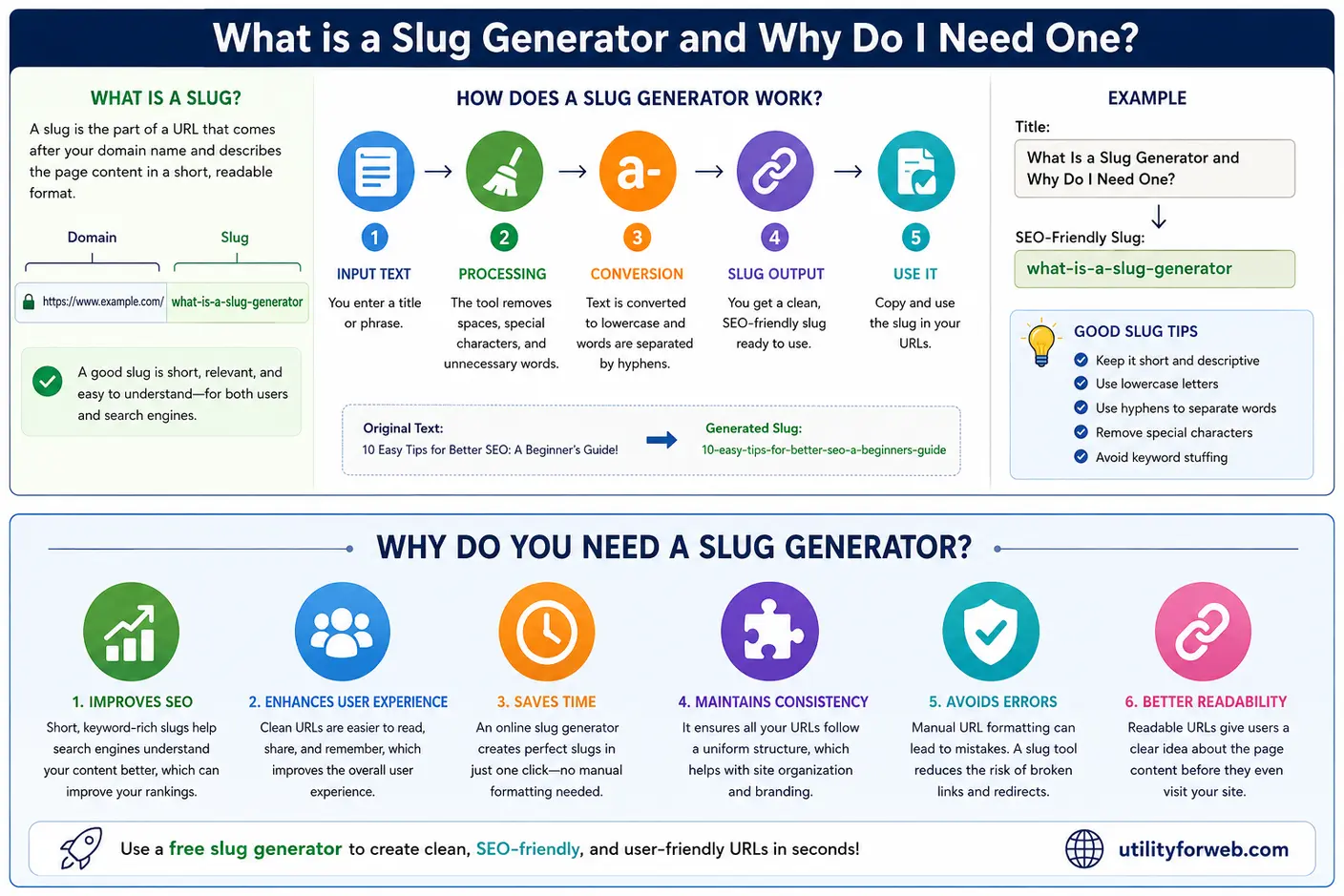
A slug generator converts a title, sentence, or piece of text into a URL-friendly format. It automates common formatting steps that would otherwise require manual editing.
Suppose you enter this title:
How Does a Slug Generator Make URLs More Readable?
A slug maker could convert it into:
how-does-a-slug-generator-make-urls-more-readable
The generated slug uses lowercase letters, separates words with hyphens, and removes the question mark. The result is easier to read and more suitable for a URL path.
Here is how an online slug generator typically performs this conversion.
-
Convert Text to Lowercase: The generator converts uppercase letters into lowercase characters.
How Does a Slug Generator Workbecomes
how does a slug generator work -
Remove Unnecessary Punctuation: Depending on the tool's rules, punctuation and symbols that do not add useful meaning are removed or normalized.
how does a slug generator work?becomes
how does a slug generator work -
Replace Spaces With Hyphens: The generator replaces spaces between words with hyphens.
how-does-a-slug-generator-workHyphens make the boundaries between words easier to identify.
-
Clean Up the Result: The tool can remove repeated separators and unnecessary spaces to produce a more consistent slug.
-
Generate the Final Slug: The cleaned text is ready to review and use as part of a webpage URL.
This automated process saves time and helps maintain a consistent format across website pages. You should still review the generated slug to ensure it describes the content accurately.
Before and After: Examples of Readable URLs
Examples make it easier to see how a slug generator transforms titles into clean URL slugs.
| Original Title or URL | Readable URL Slug |
|---|---|
| HOW TO START A SMALL BUSINESS! | how-to-start-a-small-business |
| Tips & Tricks for Better Photography | tips-tricks-for-better-photography |
| A Beginner's Guide to Personal Finance | a-beginners-guide-to-personal-finance |
| Healthy Breakfast Ideas for Busy Mornings | healthy-breakfast-ideas-busy-mornings |
| How to Improve Website Loading Speed? | improve-website-loading-speed |
These examples demonstrate how a slug maker can remove unnecessary formatting while preserving the main topic. The exact output depends on the tool and its conversion rules.
How Readable URLs Support SEO
URL readability is one part of a well-organized website. Descriptive URLs can help visitors understand page topics, while meaningful words in a URL provide search engines with additional context about the destination.
Google recommends using descriptive words in URLs and organizing website addresses logically. However, a readable slug alone does not guarantee better search rankings.
1. Use Descriptive Words
Compare example.com/article-154 with example.com/email-marketing-checklist.
The second URL describes its subject more clearly. Visitors can recognize the likely topic without relying entirely on the page title or surrounding text.
Choose words that accurately represent the page. Avoid vague labels when a descriptive phrase can explain the content more effectively.
2. Include Relevant Keywords Naturally
Relevant words can make a URL more informative. For example, a page about caring for indoor plants could use indoor-plant-care.
You do not need to include every target keyword in the slug. A long URL such as free-slug-generator-slug-maker-online-slug-generator-tool is repetitive and difficult to read.
Use a concise phrase that describes the main subject. Keyword stuffing makes URLs less natural and does not guarantee improved rankings.
3. Maintain a Logical URL Structure
Descriptive directories and slugs can help people understand how a page fits into a website.
For example, example.com/tools/slug-generator indicates that the page belongs to a tools section and relates to slug generation.
Use a consistent structure that suits your website. Avoid adding unnecessary directory levels or changing URLs without a clear reason.
4. Remember That SEO Depends on Multiple Factors
A clean URL is not a replacement for useful content, relevant information, technical SEO, accessible navigation, or a good user experience.
A page with a descriptive slug can still perform poorly if it does not satisfy search intent or provide value to visitors. Treat readable URLs as one component of your broader SEO strategy.
What Makes a Good URL Slug?
A well-crafted slug captures the main idea of a webpage using clear, relevant words and a simple format. Follow these practices when creating URLs.
-
Keep It Short and Descriptive: Remove words that do not add useful information, but preserve enough context to identify the topic.
For example,
improve-home-office-productivityis more concise thanthe-best-and-most-effective-ways-to-improve-your-home-office-productivity. -
Use Lowercase Letters: Lowercase slugs create a consistent format and help avoid accidental variations on systems where URL paths are case-sensitive.
-
Separate Words With Hyphens: Prefer
beginner-guide-to-yogainstead ofbeginner_guide_to_yoga. Hyphens provide clear word separation. -
Remove Unnecessary Punctuation: Remove decorative punctuation when doing so preserves the intended meaning of the phrase.
-
Avoid Keyword Stuffing: Choose keywords that accurately describe your page, and keep the URL natural and easy to understand rather than overloading it with search terms.
-
Match the Page Content: A slug should describe the actual destination. Do not use a misleading phrase simply because it contains a popular keyword.
Should You Remove Short Words From a URL Slug?
Words such as "a," "the," "for," "and," and "of" are often called stop words in SEO discussions. Removing some of these words can shorten a slug, but removing every small word is not necessary.
For example, compare:
guide-to-choosing-a-running-shoe
guide-choosing-running-shoe
The first version reads more naturally, while the second is shorter but less fluent. The best choice depends on whether the removed words improve or reduce clarity.
Use a free slug generator to create an initial version, then review the result. Readability and relevance should guide the final decision rather than a strict rule about removing particular words.
Can a Slug Generator Be Used for Different Types of Pages?
Yes. A slug generator can help create URL slugs for many kinds of website content.
Blog Posts
Blog titles often contain questions, punctuation, or long phrases. A generator can convert them into shorter slugs.
Title: How Can You Improve Your Website's Loading Speed?
Slug: improve-website-loading-speed
E-Commerce Product Pages
Product slugs can include a product name or another useful identifying detail.
Product: Classic Black Cotton T-Shirt
Slug: classic-black-cotton-t-shirt
For product variants, follow your store's URL strategy and avoid creating unnecessary duplicate pages.
Service Pages
Service pages benefit from clear names that communicate the service offered.
Title: Professional Website Maintenance Services
Slug: website-maintenance-services
Tutorials and Documentation
Descriptive slugs help readers identify instructions and reference pages.
Title: How to Connect an API to Your Application
Slug: connect-api-to-application
Regardless of the page type, review the generated slug for accuracy, readability, and uniqueness before publishing it.
How to Use a Free Slug Generator
An online slug generator helps you prepare clean URLs without manually adjusting each character.
You can use the free online slug generator from UtilityForWeb to convert ordinary text into a URL-friendly slug.
Follow these steps:
- Enter Your Text: Copy the title, product name, or phrase you want to convert.
- Generate the Slug: Let the tool convert the text into a URL-friendly format.
- Review the Output: Check the spelling, word separation, and meaning of the generated slug.
- Make Improvements: Shorten the slug if needed, without removing words that are important for clarity.
- Check for Duplicates: Confirm that the proposed slug does not conflict with an existing page.
- Use It in Your Website: Add the reviewed slug to your publishing system and check the final URL before publishing.
The tool also supports converting a slug back into title-case text, which can be useful when you need to turn a URL-friendly value into a readable phrase.
Slug Generator vs. Manual Slug Creation
You can create URL slugs manually or use a slug maker to automate routine formatting. Both approaches can work, but a generator can be more convenient when you publish frequently.
| Feature | Manual Creation | Slug Generator |
|---|---|---|
| Lowercase conversion | Manual | Usually automatic |
| Space replacement | Manual | Usually automatic |
| Character cleanup | Manual | Handled according to tool rules |
| Consistency | Depends on the person | Easier to maintain |
| Speed | Can be slower for many pages | Fast for routine conversions |
| Human review | Required | Still recommended |
Manual creation gives you direct control over every word. An online slug generator handles repetitive formatting and can help reduce small errors. A practical workflow is to generate the slug automatically and review it before publication.
Common URL Slug Mistakes to Avoid
1. Adding Too Many Keywords
A slug such as best-free-online-slug-generator-slug-maker-tool is repetitive and difficult to scan.
A more concise option, such as online-slug-generator-guide, communicates the subject more naturally. Keep only the words that clearly describes what the page is about.
2. Keeping Unnecessary Numbers
A slug such as best-laptop-buying-guide-83917 may look untidy when the number serves no purpose.
Include numbers when they help distinguish a product, version, model, or year. Keep them when they add meaningful context and remove them when they do not.
3. Creating Duplicate Slugs
Two pages may have similar titles, especially on large websites. Check whether a proposed slug already exists and make the distinction clear when the pages cover different subjects.
4. Changing Published URLs Without a Redirect
Changing an established slug can break existing links if the old URL no longer works. If you need to change a published URL, configure an appropriate permanent redirect, update internal links, and check for broken references.
Do not change an established URL simply to make it slightly shorter when the current version already describes the page clearly.
5. Ignoring Language and Meaning
Websites serving audiences who speak different languages should consider which words their readers recognize. Check how your slug generator handles non-English characters and make sure the resulting URL works correctly.
Frequently Asked Questions
1. How does a slug generator make URLs more readable?
A slug generator converts text into a URL-friendly format by performing tasks such as converting letters to lowercase, replacing spaces with hyphens, and removing or normalizing unnecessary punctuation. This creates a simpler URL that readers can quickly scan and understand.
2. Is a free slug generator useful for SEO?
A free slug generator can help you create descriptive and consistent URLs, which supports good URL practices. However, using the tool does not guarantee higher rankings. Content quality, relevance, technical SEO, and user experience remain important.
3. Why should URL slugs use hyphens?
Hyphens visually separate words, making multiword slugs easier to read. They are generally preferred over underscores as word separators in URLs.
4. How long should a URL slug be?
There is no universal ideal length for every URL slug. Aim for a concise phrase that describes the page accurately. Remove unnecessary words while keeping the main topic clear.
5. Can I use a slug maker for product pages?
Yes. A slug maker can help format product names, category names, blog titles, and other page text into URL-friendly slugs. Review each result and check for duplicate URLs before publishing.
6. Can I change a URL slug after publishing?
Yes, but plan the change carefully. If the old URL has been shared, indexed, or linked to, set up an appropriate permanent redirect to the new URL and update internal links where possible.
7. Does an online slug generator require installation?
A browser-based online slug generator generally does not require software installation. You can open the tool in a browser and convert text into a slug. Check the individual tool's features and requirements before using it.
8. Should I include the target keyword in every URL?
No. Include relevant words when they accurately describe the page, but avoid forcing keywords into the URL. A concise, descriptive slug is more useful than a repetitive list of search terms.
Final Thoughts
Readable URLs help visitors understand what a webpage is about before opening it. Descriptive words, clear separators, consistent formatting, and logical URL structures make website addresses easier to scan, share, and recognize.
A free slug generator automates the routine work of turning titles into URL-friendly slugs. A slug maker can help maintain consistent formatting, while an online slug generator makes the process convenient directly from your browser.
For the best results, treat generated slugs as a starting point. Review each result, remove unnecessary words, check for duplicates, and ensure the slug accurately represents the page content. Combine readable URLs with useful content and a logical website structure to create a better experience for visitors and search engines.
Ready to create cleaner URLs? Try the free Text to Slug tool from UtilityForWeb to convert your text into a readable, URL-friendly slug.